---
title: "A Gallery of Statistical Paradoxes"
subtitle: "Counterintuitive results in probability, statistics, and networks — explained simply"
author: ""
output:
html_document:
css: styles.css
theme: flatly
highlight: tango
toc: true
toc_float: true
code_folding: show
self_contained: true
---
```{r setup, include=FALSE}
directory<-if (rstudioapi::isAvailable()) paste0(dirname(rstudioapi::getActiveDocumentContext()$path),"/") else ""
source(paste0(directory, "R/code_options.R"))
source(paste0(directory, "R/code_rwf.R"))
library(ggplot2)
library(patchwork)
```
# Introduction
A "paradox" here doesn't mean something impossible — it means something that is
mathematically true but goes against what our intuition expects. These come up
constantly in real data: in medicine, sports, hiring, machine learning, and
everyday probability. Each section below explains one paradox in plain language,
shows the R code that simulates or visualizes it, and displays the resulting
graph on its own so it's easy to study in isolation.
# Simpson's Paradox
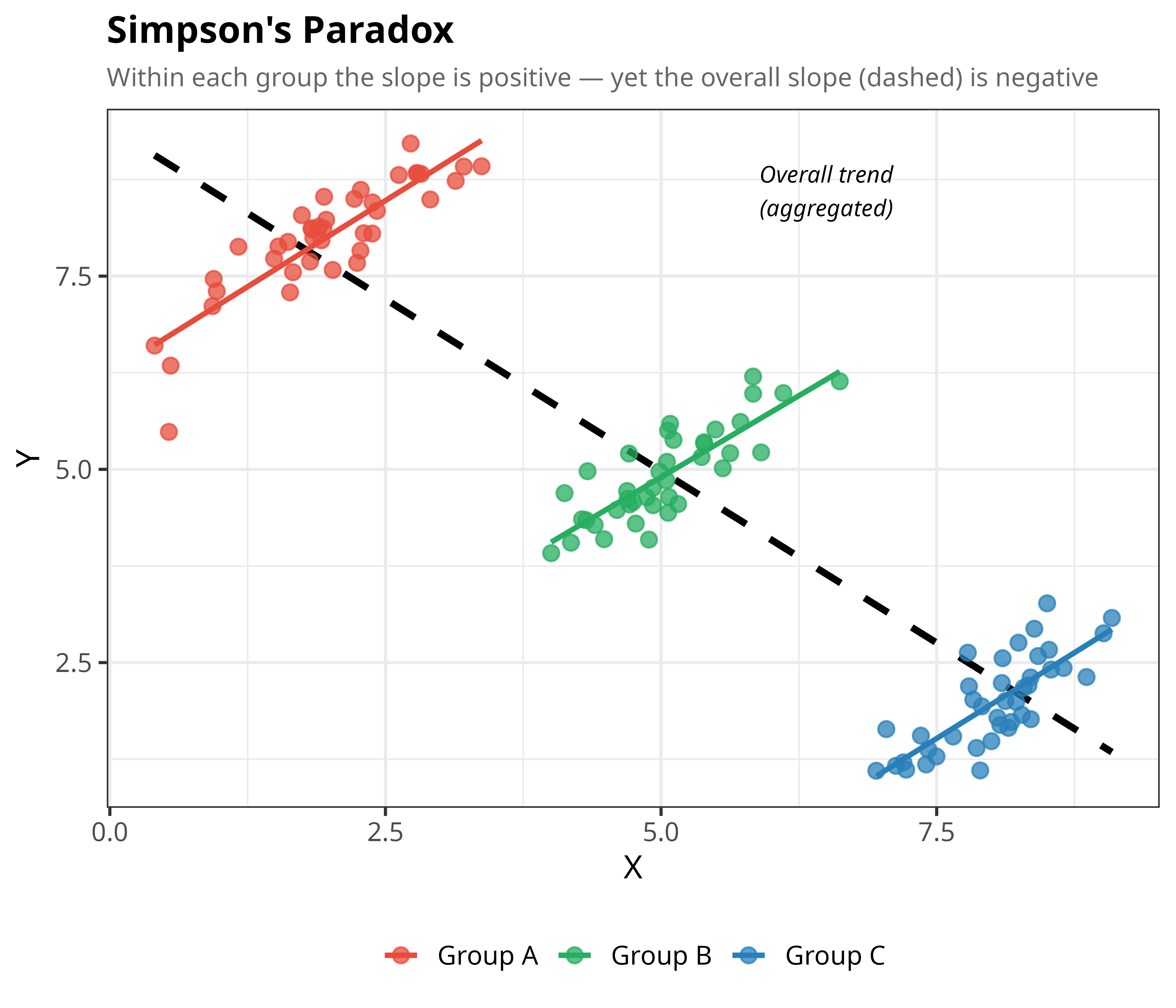
**The idea:** A trend can be true in *every single subgroup* of your data, yet
completely reverse once you combine all the groups together. Imagine three
schools where students who study more score higher *within each school* — but
the school where students study most has the lowest-scoring intake, so across
all schools combined, more study looks linked to *lower* scores. Nothing
dishonest is happening; it's just a
consequence of how the groups sit relative to each other.
```{r simpsons}
set.seed(42)
n <- 40

# Three groups: each has a positive local slope,
# but they're staggered so the global slope is negative.
make_group <- function(mx, my, label) {
  x <- rnorm(n, mean = mx, sd = 0.6)
  y <- my + 0.9 * (x - mx) + rnorm(n, sd = 0.4)
  data.frame(x = x, y = y, group = label)
}

dat <- rbind(
  make_group(mx = 2, my = 8, label = "Group A"),
  make_group(mx = 5, my = 5, label = "Group B"),
  make_group(mx = 8, my = 2, label = "Group C")
)

ggplot(dat, aes(x = x, y = y)) +
  # Overall (aggregated) trend — negative
  geom_smooth(
    method  = "lm", se = FALSE,
    color   = "black", linetype = "dashed", linewidth = 1.4
  ) +
  # Per-group trends — positive
  geom_smooth(
    aes(color = group),
    method = "lm", se = FALSE, linewidth = 1.1
  ) +
  # Points
  geom_point(aes(color = group), size = 2.8, alpha = 0.75) +
  scale_color_manual(
    values = c("Group A" = "#E74C3C",
               "Group B" = "#27AE60",
               "Group C" = "#2980B9")
  ) +
  annotate(
    "text", x = 6.5, y = 8.6, label = "Overall trend\n(aggregated)",
    size = 3.5, color = "black", fontface = "italic"
  ) +
  labs(
    title    = "Simpson's Paradox",
    subtitle = "Within each group the slope is positive — yet the overall slope (dashed) is negative",
    x        = "X",
    y        = "Y",
    color    = NULL
  ) +
  theme_bw(base_size = 14) +
  theme(
    plot.title    = element_text(face = "bold", size = 16),
    plot.subtitle = element_text(color = "grey40", size = 11),
    legend.position = "bottom",
  )
```
Each colored line (one per group) slopes upward. But the dashed black line —
fit across all the points at once, ignoring group membership — slopes
*downward*. Always check whether a relationship holds within subgroups before
trusting an overall trend.
# Infinitely Many Perfect Fits (Overfitting)
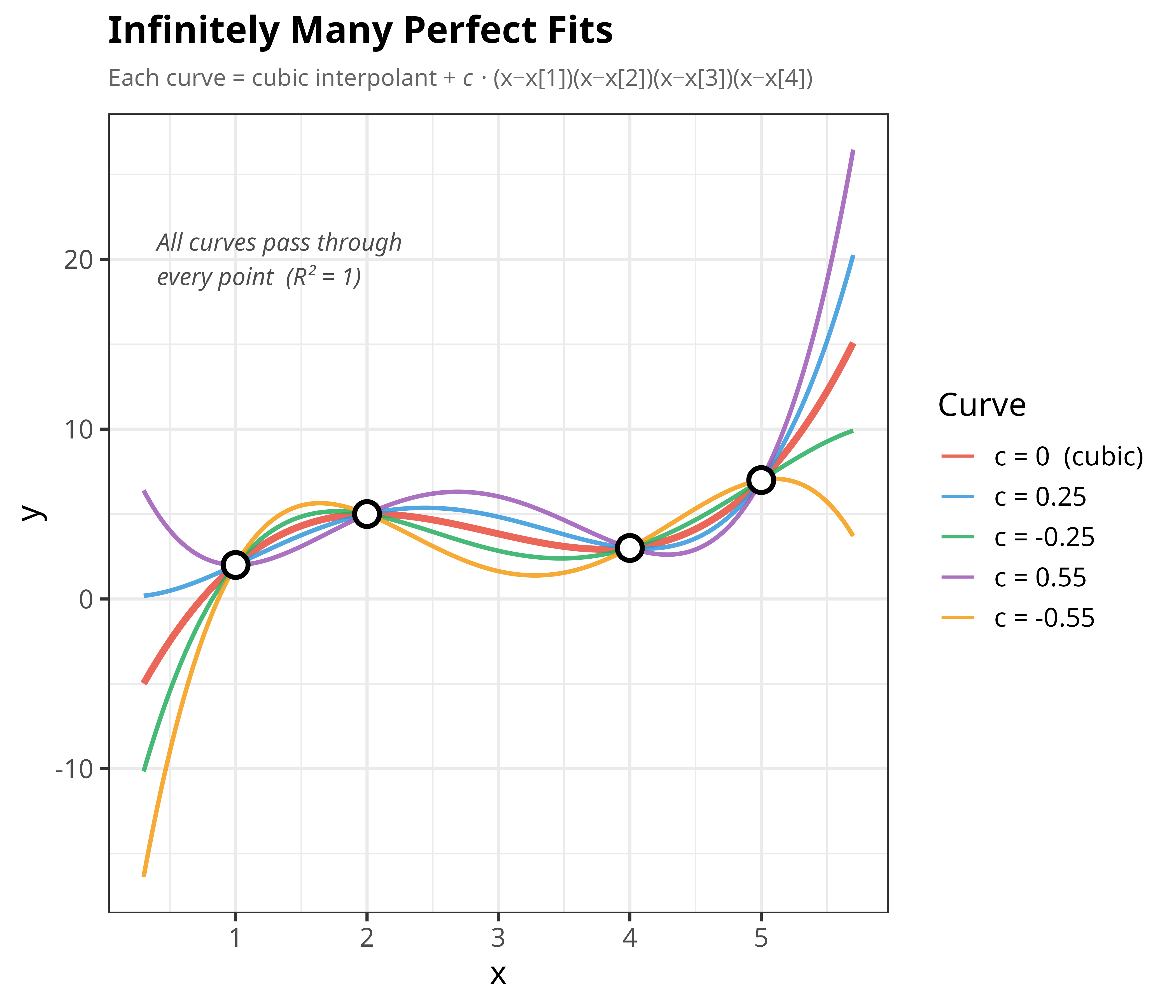
**The idea:** With only a handful of data points, there isn't just one curve
that fits them perfectly — there are *infinitely many*. Here we start with 4
points and a cubic curve that passes through all of them exactly
(R² = 1, a "perfect" fit). Then we show that we can wiggle that curve in
endless different ways, and every single variant *still* passes through all 4
points with the same perfect R². A perfect fit on tiny or noisy data doesn't
mean you've found the truth — it can just mean the model is flexible enough to
memorize whatever points you gave it. This is the core intuition behind
overfitting.
```{r overfitting}
# --- 4 data points ---
pts <- data.frame(
  x = c(1, 2, 4, 5),
  y = c(2, 5, 3, 7)
)

# --- Base: unique cubic interpolant through all 4 points ---
fit <- lm(y ~ poly(x, 3, raw = TRUE), data = pts)

x_seq <- seq(0.3, 5.7, length.out = 600)
y_base <- predict(fit, newdata = data.frame(x = x_seq))

# --- "Wiggle" term: zero at every data point, so adding it keeps R²=1 ---
wiggle <- (x_seq - pts$x[1]) *
  (x_seq - pts$x[2]) *
  (x_seq - pts$x[3]) *
  (x_seq - pts$x[4])

# --- Build family of perfect-fit curves by varying c ---
c_vals  <- c(0, 0.25, -0.25, 0.55, -0.55)
c_labels <- c("c = 0  (cubic)", "c = 0.25", "c = -0.25", "c = 0.55", "c = -0.55")

curves <- do.call(rbind, lapply(seq_along(c_vals), function(i) {
  data.frame(
    x     = x_seq,
    y     = y_base + c_vals[i] * wiggle,
    curve = c_labels[i]
  )
}))

curves$curve <- factor(curves$curve, levels = c_labels)

ggplot() +
  geom_line(
    data  = curves,
    aes(x = x, y = y, color = curve, linewidth = curve == "c = 0  (cubic)"),
    alpha = 0.85
  ) +
  scale_linewidth_manual(values = c(`TRUE` = 1.4, `FALSE` = 0.9), guide = "none") +
  geom_point(
    data  = pts,
    aes(x = x, y = y),
    size  = 4, shape = 21, fill = "white", color = "black", stroke = 1.5
  ) +
  scale_color_manual(
    values = c(
      "c = 0  (cubic)" = "#E74C3C",
      "c = 0.25"       = "#3498DB",
      "c = -0.25"      = "#27AE60",
      "c = 0.55"       = "#9B59B6",
      "c = -0.55"      = "#F39C12"
    )
  ) +
  annotate(
    "text", x = 0.4, y = 20,
    label    = "All curves pass through\nevery point  (R² = 1)",
    hjust    = 0, size = 3.6, color = "grey30", fontface = "italic"
  ) +
  labs(
    title    = "Infinitely Many Perfect Fits",
    subtitle = expression(
      "Each curve = cubic interpolant + " * italic(c) * " · (x−x[1])(x−x[2])(x−x[3])(x−x[4])"
    ),
    x     = "x",
    y     = "y",
    color = "Curve"
  ) +
  theme_bw(base_size = 14) +
  theme(
    plot.title    = element_text(face = "bold", size = 16),
    plot.subtitle = element_text(color = "grey40", size = 10),
    legend.position = "right"
  )
```
Notice how wildly the curves diverge away from the 4 known points, even though
they agree perfectly *at* those points. Between and beyond the data, they tell
completely different stories — a warning against trusting a model just
because it fits your training data perfectly.
# Anscombe's Quartet
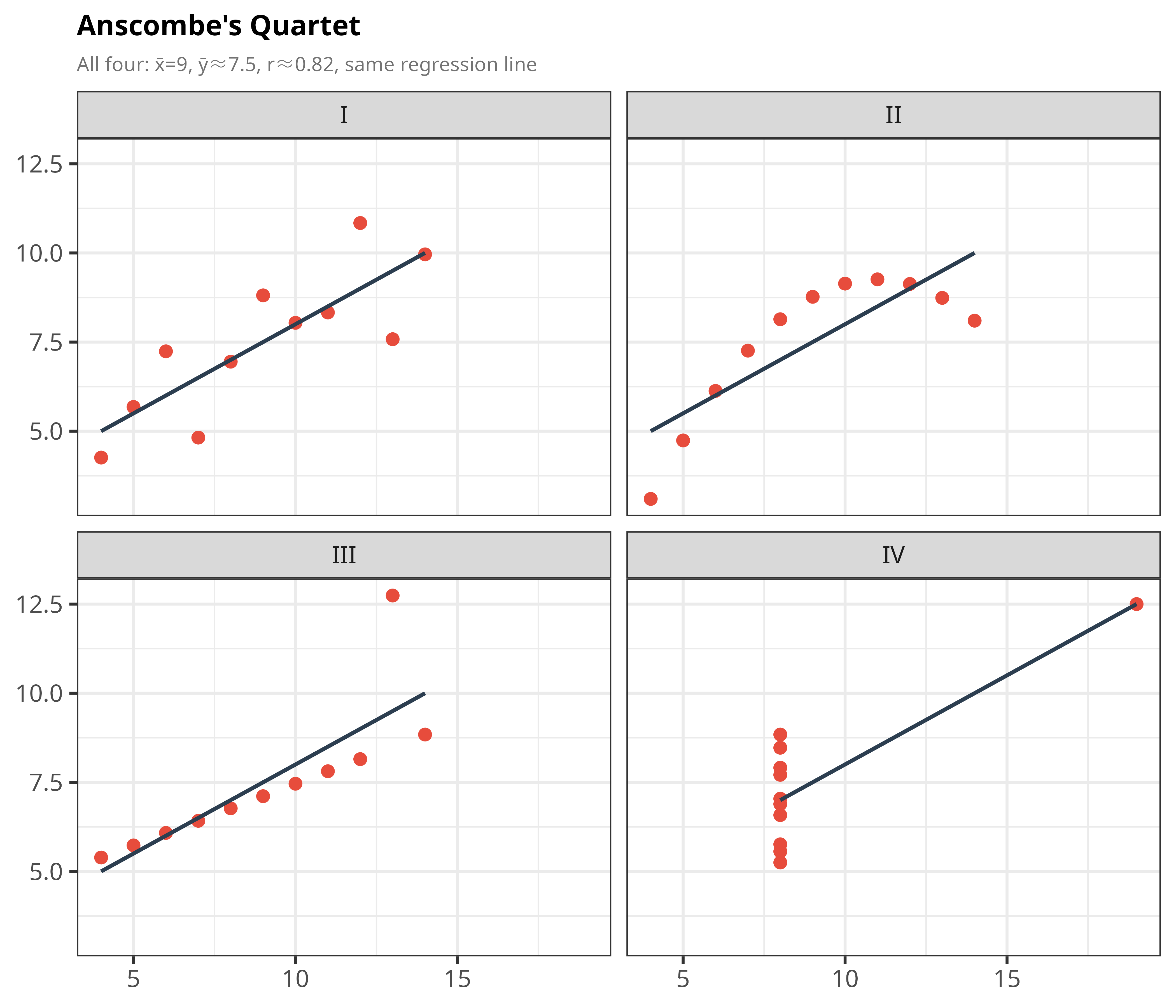
**The idea:** Four datasets can have *nearly identical* means, variances,
correlations, and best-fit regression lines (equal to two or three decimal
places) — while looking
nothing alike when plotted. One is a clean straight-line relationship, one is
a curve, one has a single outlier bending an otherwise perfect line, and one
is a vertical cluster distorted by a single extreme point. The lesson: summary
statistics can hide very different realities. Always plot your data.
```{r anscombe}
t <- theme_bw(base_size = 13) +
  theme(
    plot.title    = element_text(face = "bold", size = 12),
    plot.subtitle = element_text(color = "grey45", size = 8.5),
    legend.position = "bottom",
    legend.key.size = unit(0.5, "lines")
  )

data(anscombe)
al <- data.frame(
  x = c(anscombe$x1, anscombe$x2, anscombe$x3, anscombe$x4),
  y = c(anscombe$y1, anscombe$y2, anscombe$y3, anscombe$y4),
  ds = factor(rep(c("I", "II", "III", "IV"), each = 11))
)

p1 <- ggplot(al, aes(x, y)) +
  geom_point(color = "#E74C3C", size = 2) +
  geom_smooth(method = "lm", se = FALSE, color = "#2C3E50", linewidth = 0.8) +
  facet_wrap(~ds, nrow = 2) +
  labs(
    title    = "Anscombe's Quartet",
    subtitle = "All four: x̄=9, ȳ≈7.5, r≈0.82, same regression line",
    x = NULL, y = NULL
  ) + t

p1
```
Every one of these four panels has virtually identical summary numbers. Only by
plotting them do you see that dataset II is curved, dataset III has an outlier
throwing off an otherwise perfect line, and dataset IV is driven entirely by
one extreme x-value.
# Regression to the Mean
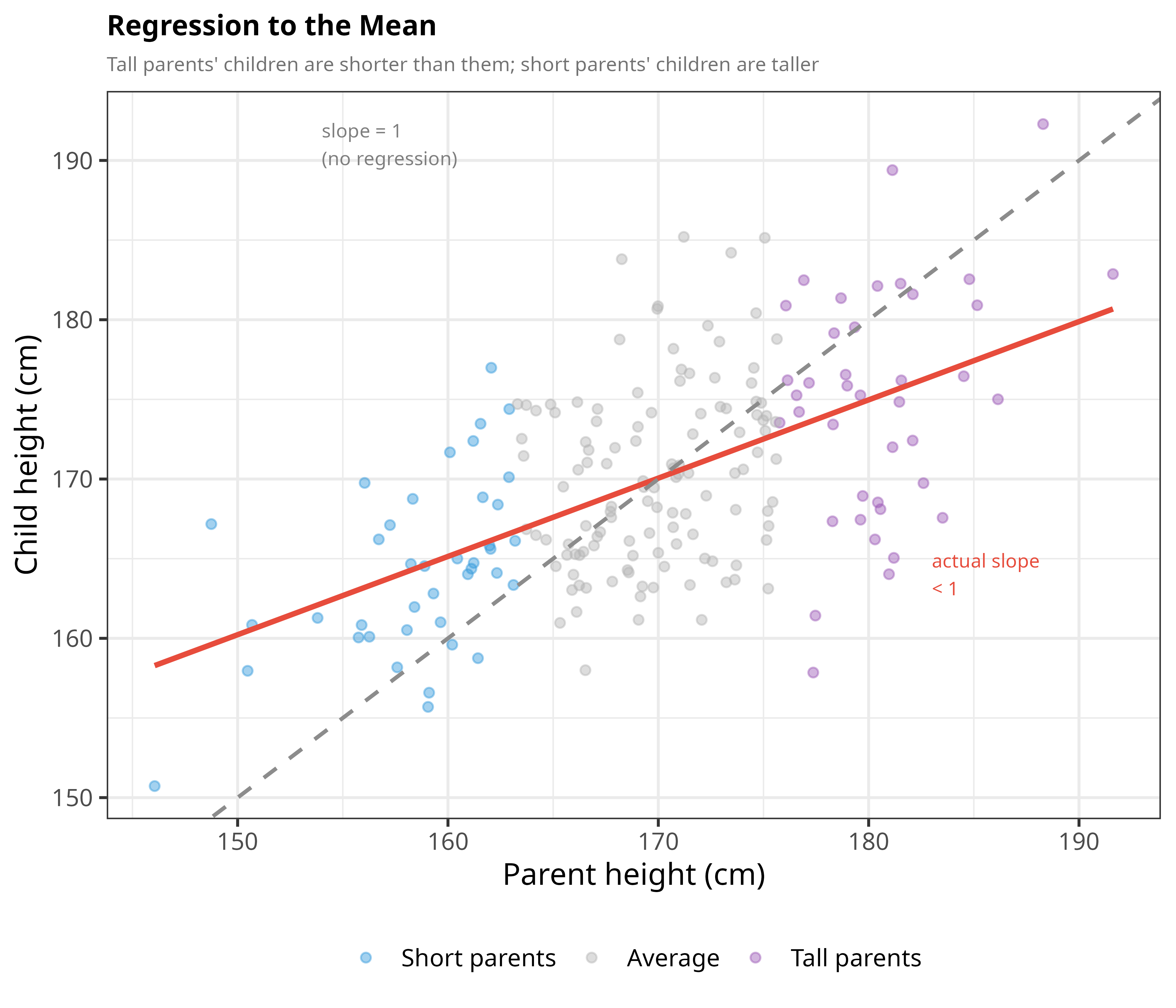
**The idea:** Extremely tall parents tend to have children who are tall, but
usually a bit closer to average than the parents were. This isn't because
nature is "pulling" people toward average — it happens naturally whenever a
trait combines something real and inherited with a random element (luck,
measurement noise, etc.). Any time you pick an extreme case, part of how
extreme it was is just chance, and chance doesn't repeat, so the next
measurement tends to look more ordinary.
```{r regression-to-mean}
set.seed(42)
n        <- 200
parent   <- rnorm(n, 170, 8)
child    <- 170 + 0.55 * (parent - 170) + rnorm(n, 0, 6)
rtm      <- data.frame(parent, child)

# Classify parents as short / average / tall for coloring
rtm$cat <- cut(rtm$parent,
               breaks = quantile(rtm$parent, c(0, .2, .8, 1)),
               labels = c("Short parents", "Average", "Tall parents"),
               include.lowest = TRUE)

p2 <- ggplot(rtm, aes(parent, child, color = cat)) +
  geom_point(alpha = 0.45, size = 1.6) +
  geom_smooth(data = rtm, aes(parent, child), inherit.aes = FALSE,
              method = "lm", se = FALSE, color = "#E74C3C", linewidth = 1.1) +
  geom_abline(slope = 1, intercept = 0, linetype = "dashed",
              color = "grey55", linewidth = 0.8) +
  annotate("text", x = 154, y = 191,
           label = "slope = 1\n(no regression)", size = 2.9,
           color = "grey50", hjust = 0) +
  annotate("text", x = 183, y = 164,
           label = "actual slope\n< 1", size = 2.9,
           color = "#E74C3C", hjust = 0) +
  scale_color_manual(
    values = c("Short parents" = "#3498DB",
               "Average"       = "grey70",
               "Tall parents"  = "#9B59B6"),
    name = NULL
  ) +
  labs(
    title    = "Regression to the Mean",
    subtitle = "Tall parents' children are shorter than them; short parents' children are taller",
    x = "Parent height (cm)", y = "Child height (cm)"
  ) + theme_bw(base_size = 13) +
  theme(plot.title = element_text(face = "bold", size = 12),
        plot.subtitle = element_text(color = "grey45", size = 8.5),
        legend.position = "bottom")

p2
```
If there were no regression effect, the red best-fit line would follow the
dashed "slope = 1" line exactly. Instead it's flatter — tall parents' children
land closer to average, and short parents' children do too.
# Will Rogers Phenomenon
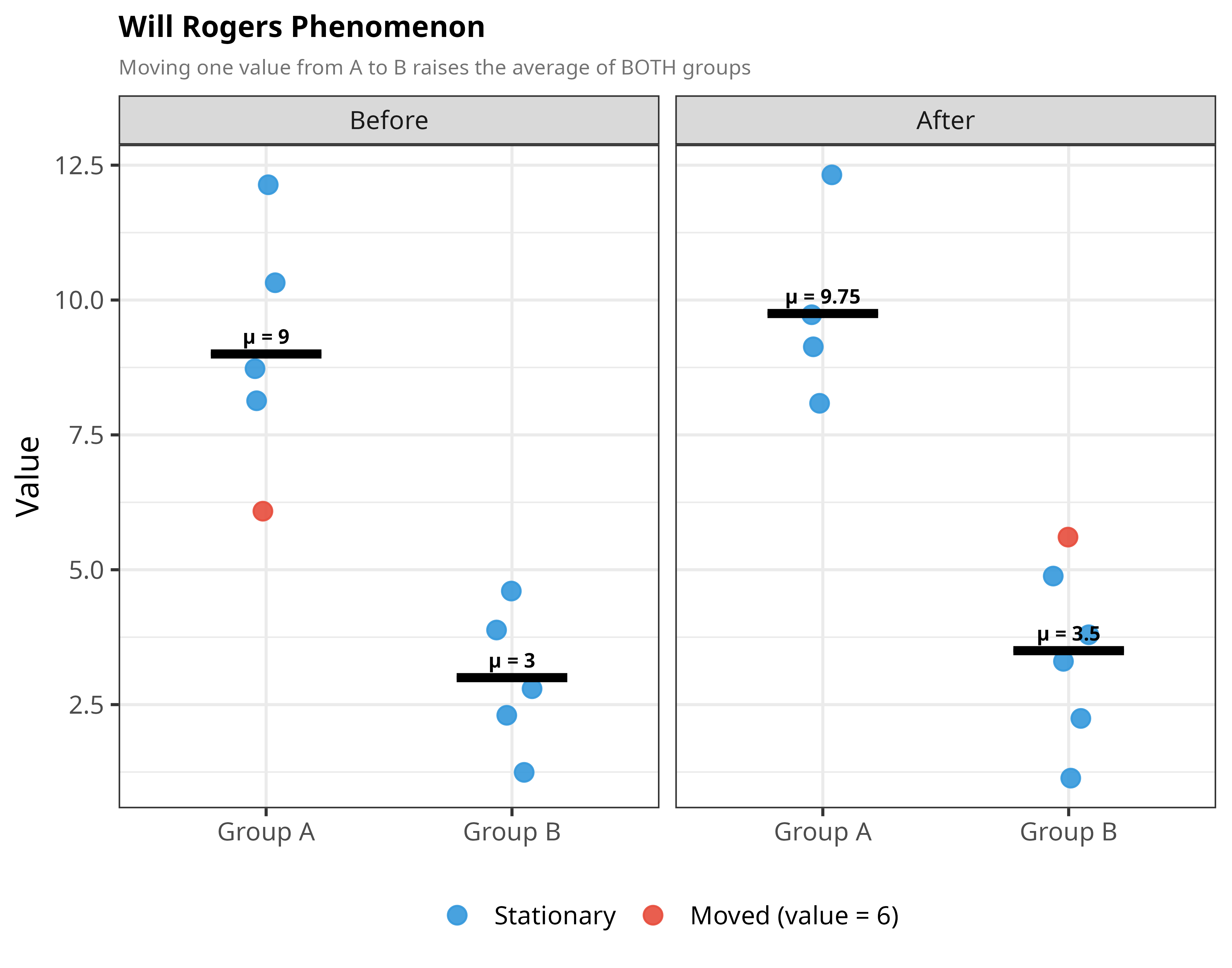
**The idea:** Named after a joke by comedian Will Rogers about migration
between US states, this shows that moving a *single* data point from one
group to another can raise the average of **both** groups — even though no
individual value actually changed. This happens when the moved value is below
the average of the group it's leaving, but above the average of the group
it's joining.
```{r will-rogers, fig.height=5.5}
a_before <- c(6, 8, 9, 10, 12)   # mean = 9.0
b_before <- c(1, 2, 3, 4,  5)   # mean = 3.0
# Move 6 from A -> B:  new mean A = 9.75 (+0.75),  new mean B = 3.5 (+0.5)
a_after  <- c(8, 9, 10, 12)
b_after  <- c(1, 2,  3,  4,  5, 6)

make_wr <- function(vals, group, timing, moved_val = NULL) {
  data.frame(
    value  = vals,
    group  = group,
    timing = timing,
    moved  = if (!is.null(moved_val)) vals == moved_val else FALSE
  )
}

wr <- rbind(
  make_wr(a_before, "Group A", "Before", 6),
  make_wr(b_before, "Group B", "Before"),
  make_wr(a_after,  "Group A", "After"),
  make_wr(b_after,  "Group B", "After", 6)
)
wr$timing <- factor(wr$timing, levels = c("Before", "After"))

wr_means <- aggregate(value ~ group + timing, wr, mean)

p3 <- ggplot(wr, aes(x = group, y = value)) +
  geom_jitter(aes(color = moved), width = 0.09, size = 3.2, alpha = 0.9) +
  geom_crossbar(data = wr_means, aes(y = value, ymin = value, ymax = value),
                width = 0.45, color = "black", linewidth = 0.7) +
  geom_text(data = wr_means,
            aes(y = value, label = paste0("μ = ", round(value, 2))),
            vjust = -0.7, size = 2.9, fontface = "bold") +
  facet_wrap(~timing) +
  scale_color_manual(
    values = c(`FALSE` = "#3498DB", `TRUE` = "#E74C3C"),
    labels = c("Stationary", "Moved (value = 6)"),
    name   = NULL
  ) +
  labs(
    title    = "Will Rogers Phenomenon",
    subtitle = "Moving one value from A to B raises the average of BOTH groups",
    x = NULL, y = "Value"
  ) + theme_bw(base_size = 13) +
  theme(plot.title = element_text(face = "bold", size = 12),
        plot.subtitle = element_text(color = "grey45", size = 8.5),
        legend.position = "bottom")

p3
```
The value "6" (highlighted in red) starts out below Group A's average of 9,
dragging it down. Once moved to Group B, it's above B's average of 3, pulling
that average up too. Result: both group averages rise, purely from
reclassification — nothing about the underlying data changed. This is a real
concern in medicine, e.g. when improved diagnostics move borderline patients
into a more severe category, apparently improving survival rates in *both*
categories.
# Berkson's Paradox
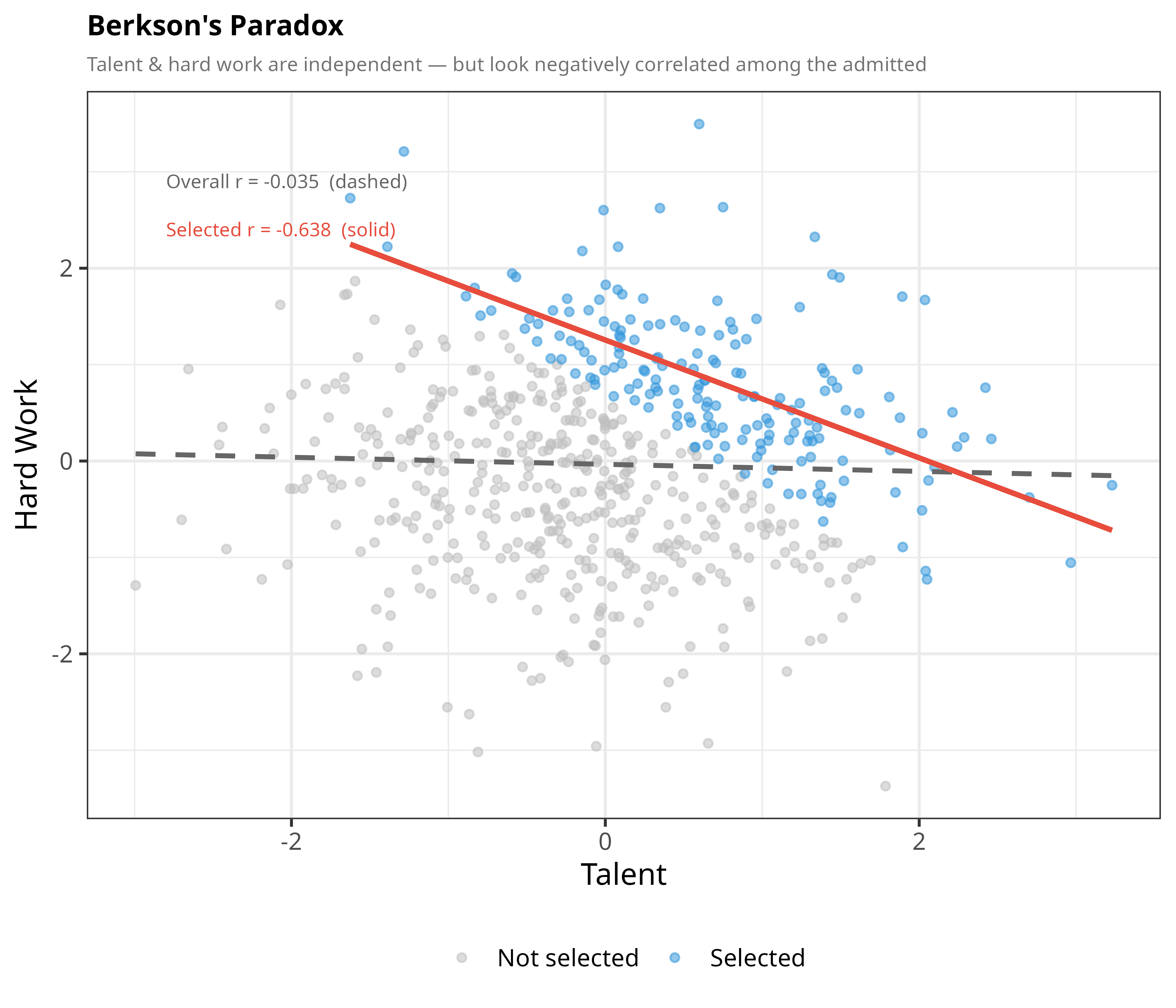
**The idea:** Two traits can be completely unrelated in the general
population, yet appear *negatively* correlated once you only look at a
selected subgroup. Classic example: talent and hard work might be independent
among all applicants to a competitive program, but among the people who
actually got *admitted*, the very talented ones didn't need to work as hard,
and the very hard-working ones didn't need as much raw talent — because
admission itself required a combination of the two. The selection process
manufactures a correlation that isn't really there.
```{r berkson}
set.seed(42)
n2        <- 600
talent    <- rnorm(n2)
hardwork  <- rnorm(n2)
selected  <- (talent + hardwork) > 0.7

berk <- data.frame(talent, hardwork, selected)

r_all <- round(cor(talent, hardwork), 3)
r_sel <- round(cor(talent[selected], hardwork[selected]), 3)

p4 <- ggplot(berk, aes(talent, hardwork, color = selected)) +
  geom_point(size = 1.4, alpha = 0.55) +
  geom_smooth(data = berk, aes(talent, hardwork), inherit.aes = FALSE,
              method = "lm", se = FALSE,
              color = "grey40", linewidth = 1, linetype = "dashed") +
  geom_smooth(data = subset(berk, selected), aes(talent, hardwork),
              inherit.aes = FALSE,
              method = "lm", se = FALSE,
              color = "#E74C3C", linewidth = 1.1) +
  scale_color_manual(
    values = c(`FALSE` = "grey75", `TRUE` = "#3498DB"),
    labels = c("Not selected", "Selected"),
    name   = NULL
  ) +
  annotate("text", x = -2.8, y = 2.9,
           label = paste0("Overall r = ", r_all, "  (dashed)"),
           hjust = 0, size = 2.9, color = "grey40") +
  annotate("text", x = -2.8, y = 2.4,
           label = paste0("Selected r = ", r_sel, "  (solid)"),
           hjust = 0, size = 2.9, color = "#E74C3C") +
  labs(
    title    = "Berkson's Paradox",
    subtitle = "Talent & hard work are independent — but look negatively correlated among the admitted",
    x = "Talent", y = "Hard Work"
  ) + theme_bw(base_size = 13) +
  theme(plot.title = element_text(face = "bold", size = 12),
        plot.subtitle = element_text(color = "grey45", size = 8.5),
        legend.position = "bottom")

p4
```
Across everyone (dashed line), talent and hard work have essentially zero
relationship. But restrict to just the blue "selected" points, and the solid
red trend line slopes clearly downward — an illusion created entirely by the
selection cutoff.
# Range Restriction: How Narrowing Your Data Kills Correlation
**The idea:** If two variables have a genuinely strong relationship, but you
only ever look at a narrow slice of one variable's range, the correlation you
measure can look weak or even vanish — not because the relationship changed,
but because you're only seeing a thin cross-section of it. This matters
anywhere data gets filtered before analysis, e.g. studying only applicants
who passed a screening test, or only patients who came back for a follow-up.
## Panel 1 — The Full Picture
```{r range-full}
set.seed(7)
n <- 400

# True relationship: x and y with r ~ 0.80
x   <- rnorm(n, mean = 50, sd = 15)
eps <- rnorm(n, sd = 15 * sqrt(1 - 0.80^2))
y   <- 0.80 * x + eps

dat       <- data.frame(x = x, y = y)
r_full    <- cor(x, y)

lo <- 42; hi <- 58
dat$selected <- x >= lo & x <= hi
r_sub <- cor(x[dat$selected], y[dat$selected])

t <- theme_minimal(base_size = 11) +
  theme(
    plot.title    = element_text(face = "bold", size = 12),
    plot.subtitle = element_text(color = "grey45", size = 8.5)
  )

p1 <- ggplot(dat, aes(x, y)) +
  geom_point(color = "#3498DB", alpha = 0.45, size = 1.6) +
  geom_smooth(method = "lm", se = TRUE, fill = "#3498DB",
              color = "#2471A3", linewidth = 1.1, alpha = 0.15) +
  annotate("label", x = 18, y = max(y) * 0.97,
           label = paste0("r = ", round(r_full, 2)),
           size = 4, fontface = "bold", color = "#2471A3",
           fill = "white", label.size = 0) +
  labs(
    title    = "Full sample  (n = 400)",
    subtitle = "Strong, clearly visible correlation",
    x = "Score (X)", y = "Outcome (Y)"
  ) + t

p1
```
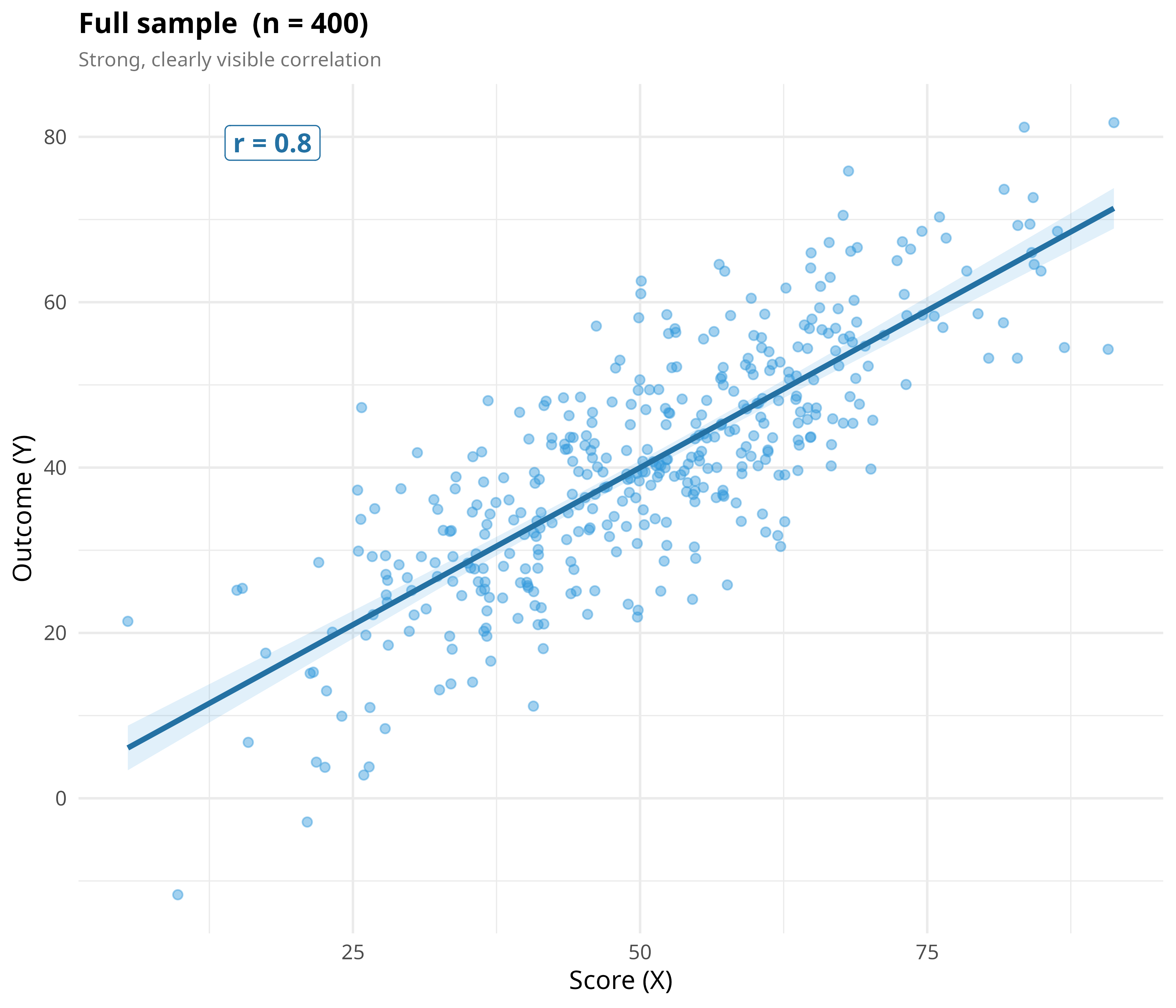
With the full range of X visible, the strong upward relationship (r ≈ 0.80)
is obvious.
## Panel 2 — Zooming Into a Narrow Window
```{r range-sub}
p2 <- ggplot(dat, aes(x, y)) +
  # shade the selected window
  annotate("rect", xmin = lo, xmax = hi, ymin = -Inf, ymax = Inf,
           fill = "#E74C3C", alpha = 0.07) +
  # grey out out-of-range points
  geom_point(data = subset(dat, !selected),
             color = "grey80", alpha = 0.35, size = 1.4) +
  # highlight in-range points
  geom_point(data = subset(dat, selected),
             color = "#E74C3C", alpha = 0.75, size = 1.8) +
  # full-sample regression (ghost)
  geom_smooth(method = "lm", se = FALSE,
              color = "#3498DB", linewidth = 0.8,
              linetype = "dashed", alpha = 0.6) +
  # subsample regression
  geom_smooth(data = subset(dat, selected), method = "lm", se = TRUE,
              fill = "#E74C3C", color = "#C0392B",
              linewidth = 1.1, alpha = 0.18) +
  # boundary markers
  geom_vline(xintercept = c(lo, hi), linetype = "dotted",
             color = "#C0392B", linewidth = 0.7) +
  annotate("label", x = (lo + hi) / 2, y = max(y) * 0.97,
           label = paste0("r = ", round(r_sub, 2), "\n(subsample)"),
           size = 3.6, fontface = "bold", color = "#C0392B",
           fill = "white", label.size = 0, vjust = 1) +
  annotate("label", x = 18, y = max(y) * 0.97,
           label = paste0("r = ", round(r_full, 2), "\n(full)"),
           size = 3.2, color = "grey55", fill = "white",
           label.size = 0, vjust = 1) +
  annotate("text", x = (lo + hi) / 2, y = min(y) + 2,
           label = paste0("[", lo, " – ", hi, "]"),
           size = 3, color = "#C0392B") +
  labs(
    title    = paste0("Subsample: x ∈ [", lo, ", ", hi, "]  (n = ",
                      sum(dat$selected), ")"),
    subtitle = "Same data, narrower window — correlation collapses",
    x = "Score (X)", y = "Outcome (Y)"
  ) + t

p2
```
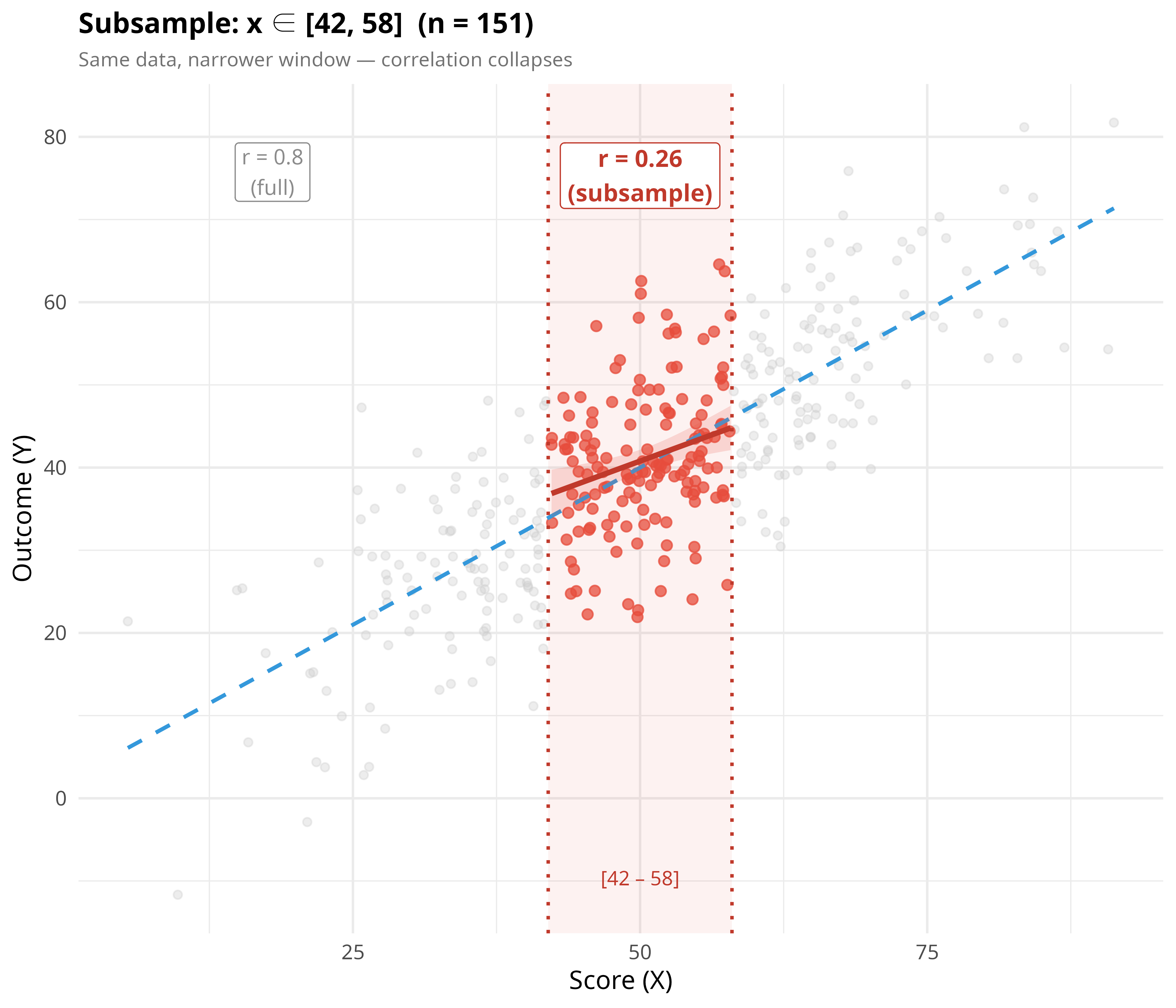
Same underlying dataset — we've just zoomed into the red-shaded window of X
values. The correlation inside that window drops sharply from
`r round(r_full,2)` to about `r round(r_sub,2)`, even though nothing about the
true relationship changed.
## Panel 3 — Correlation as a Function of Window Width
```{r range-curve}
half_widths <- seq(4, 44, by = 2)
curve_dat <- do.call(rbind, lapply(half_widths, function(hw) {
  sub <- dat[abs(dat$x - 50) < hw, ]
  data.frame(
    window_width = hw * 2,
    r            = if (nrow(sub) >= 10) cor(sub$x, sub$y) else NA,
    n_sub        = nrow(sub)
  )
}))
curve_dat <- curve_dat[!is.na(curve_dat$r), ]

used_width <- hi - lo

p3 <- ggplot(curve_dat, aes(window_width, r)) +
  geom_hline(yintercept = r_full, linetype = "dashed",
             color = "#3498DB", linewidth = 0.9) +
  geom_line(color = "#E74C3C", linewidth = 1.1) +
  geom_point(color = "#E74C3C", size = 2) +
  geom_vline(xintercept = used_width, linetype = "dotted",
             color = "#C0392B", linewidth = 0.8) +
  geom_point(data = curve_dat[curve_dat$window_width == used_width, ],
             size = 4, shape = 21, fill = "#E74C3C", color = "black", stroke = 1) +
  annotate("text", x = used_width + 1.5, y = 0.12,
           label = paste0("panel 2\n(width=", used_width, ")"),
           hjust = 0, size = 3, color = "#C0392B") +
  annotate("text", x = max(curve_dat$window_width) - 1,
           y = r_full + 0.025,
           label = paste0("true r = ", round(r_full, 2)),
           hjust = 1, size = 3.2, color = "#3498DB") +
  scale_y_continuous(limits = c(0, 1)) +
  labs(
    title    = "Observed r vs. Range Width",
    subtitle = "Narrowing the observed range shrinks the observed correlation",
    x = "Width of observed x-window",
    y = "Observed Pearson r"
  ) + t

p3
```
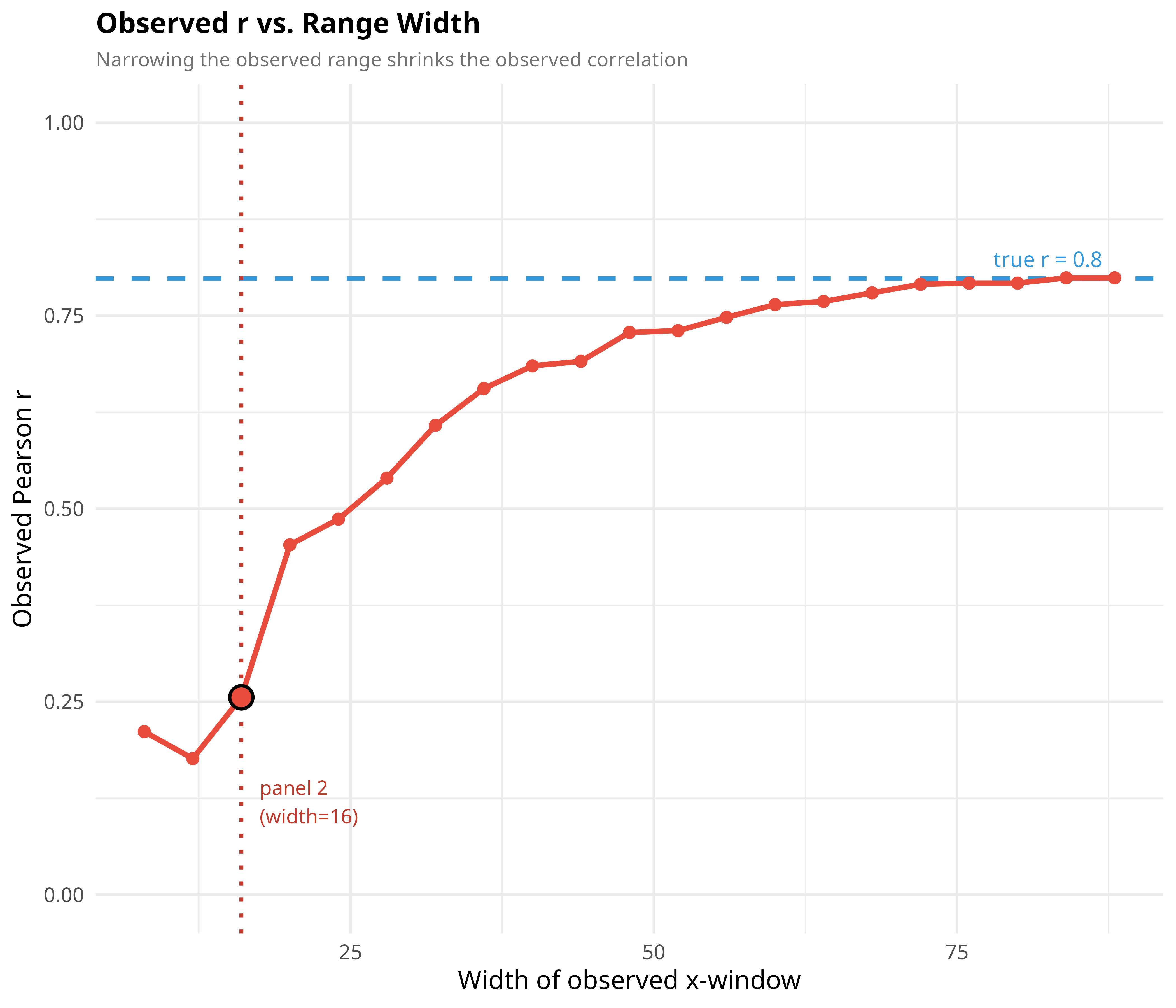
This traces out exactly how much correlation you'd measure for every possible
window width. The dashed blue line marks the "true" correlation from the full
data; the red curve shows how far below that you land the more you restrict
your range. The circled point marks the specific narrow window used in Panel
2.
# Birthday Paradox
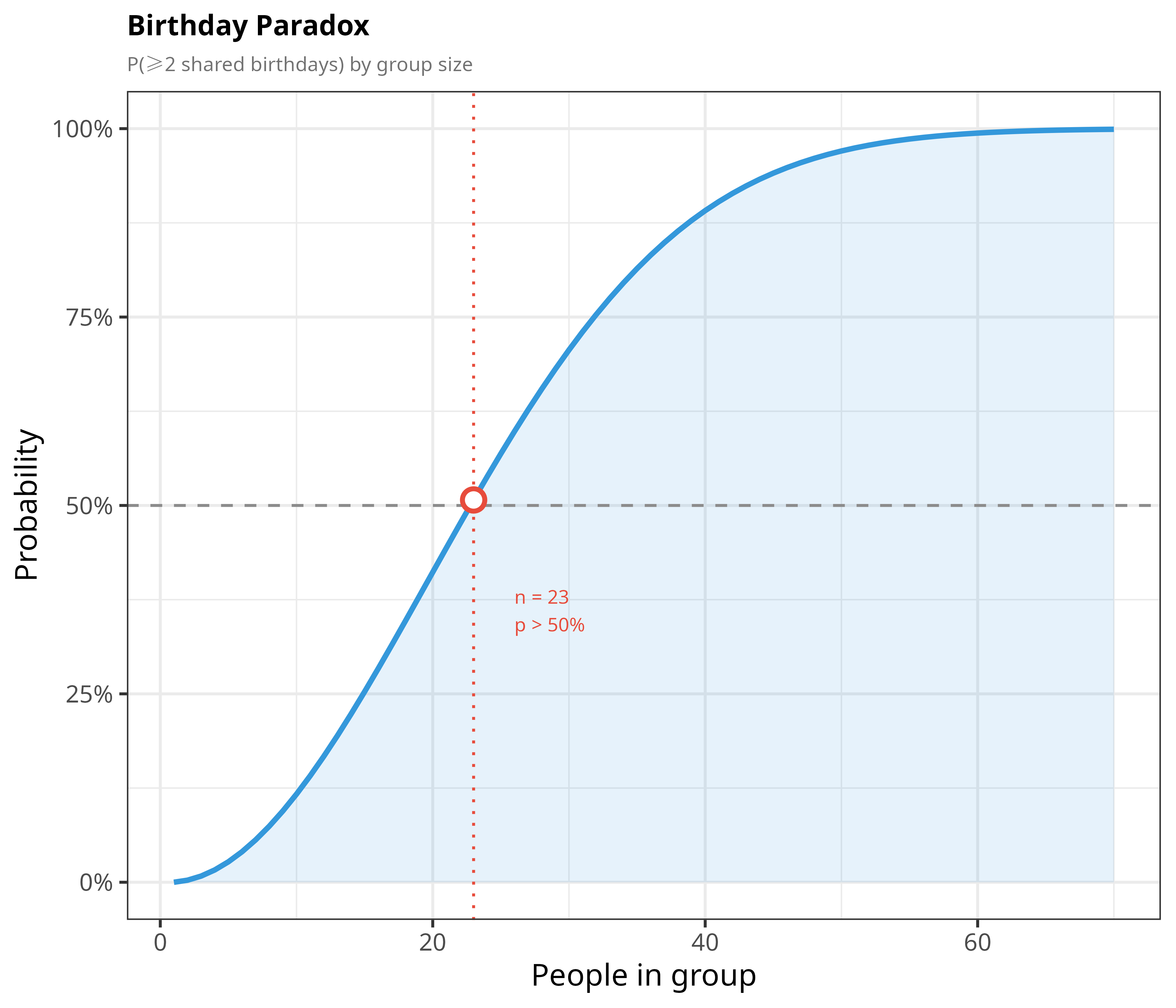
**The idea:** How many people need to be in a room before there's a
better-than-50% chance that two of them share a birthday? Most people guess
somewhere near 180 (half of 365). The real answer is just **23**. The trick is
that you're not comparing one person against everyone else — you're comparing
*every pair* of people, and the number of pairs grows much faster than the
number of people.
```{r birthday}
C1 <- "#E74C3C"; C2 <- "#3498DB"; C3 <- "#27AE60"
C4 <- "#9B59B6"; C5 <- "#F39C12"; CG <- "grey55"

t <- theme_bw(base_size = 13) + theme(
  plot.title      = element_text(face = "bold", size = 12),
  plot.subtitle   = element_text(color = "grey45", size = 8.5, lineheight = 1.2),
  legend.position = "bottom",
  legend.key.size = unit(0.4, "lines"),
  legend.text     = element_text(size = 8)
)

bd <- data.frame(n = 1:70)
bd$prob <- sapply(bd$n, function(n) 1 - prod((365:(365 - n + 1)) / 365))

p1 <- ggplot(bd, aes(n, prob)) +
  geom_ribbon(aes(ymin = 0, ymax = prob), fill = C2, alpha = 0.12) +
  geom_line(color = C2, linewidth = 1.1) +
  geom_hline(yintercept = 0.5, linetype = "dashed", color = CG) +
  geom_vline(xintercept = 23, linetype = "dotted", color = C1) +
  geom_point(data = bd[bd$n == 23, ], size = 3.5,
             shape = 21, fill = "white", color = C1, stroke = 1.5) +
  annotate("text", x = 26, y = 0.36, hjust = 0, size = 2.9, color = C1,
           label = "n = 23\np > 50%") +
  scale_y_continuous(labels = function(x) paste0(round(x * 100), "%"),
                     limits = c(0, 1)) +
  labs(title = "Birthday Paradox",
       subtitle = "P(≥2 shared birthdays) by group size",
       x = "People in group", y = "Probability") + t

p1
```
The probability curve crosses 50% at just 23 people, and by around 70 people
it's essentially guaranteed. Pairwise comparisons scale much faster than
intuition expects.
# False Positive Paradox (Base Rate Fallacy)
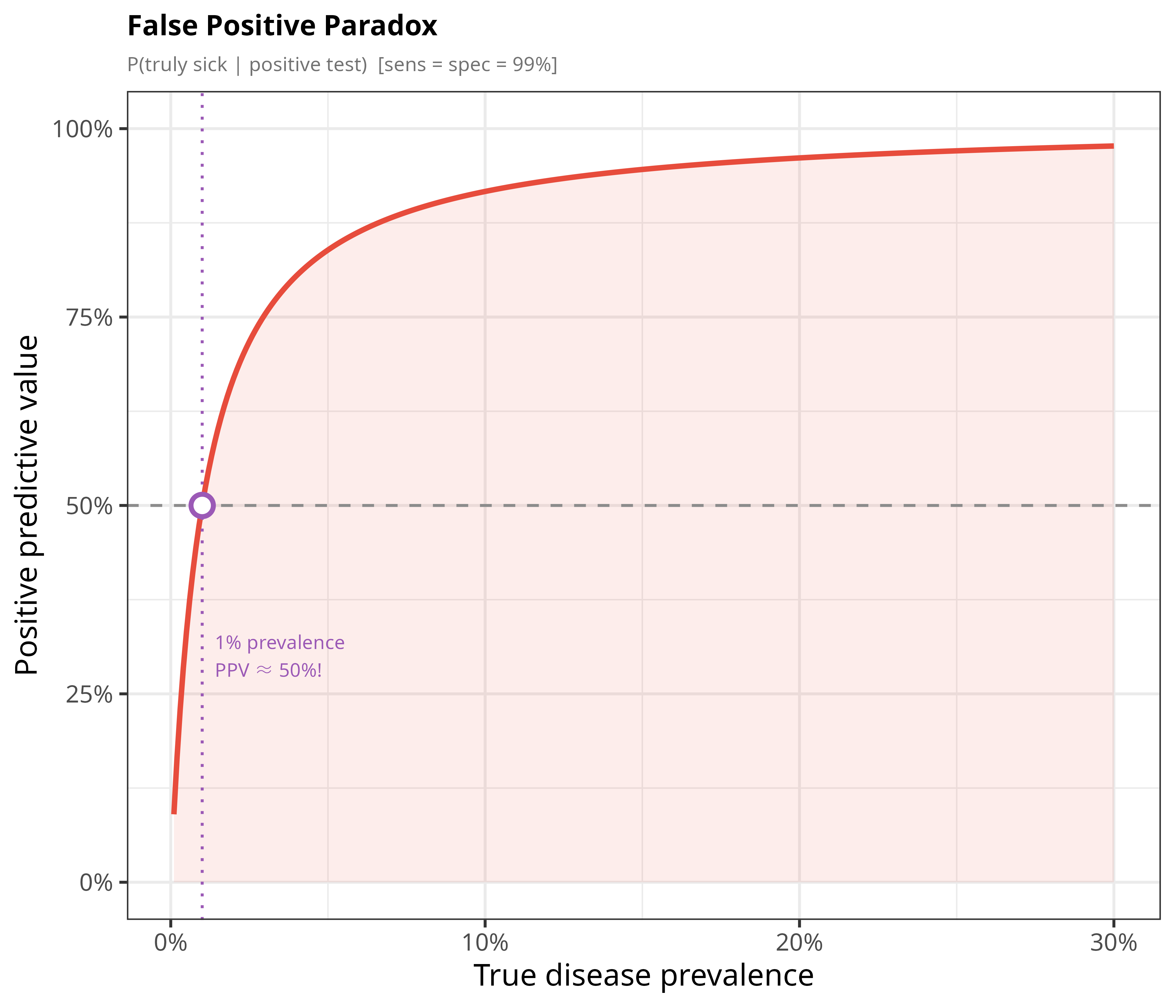
**The idea:** Even a highly accurate medical test can be wrong about *you* as
often as it's right, or more often, if the condition it's testing for is rare. If a
test is 99% accurate (both at correctly flagging sick people and correctly
clearing healthy ones), but only 1% of the population actually has the
disease, roughly half of all positive results will still be false alarms.
Rarity, not test quality, is what dominates here.
```{r false-positive}
prev_seq <- seq(0.001, 0.30, length.out = 300)
sens <- 0.99; spec <- 0.99
ppv  <- (sens * prev_seq) / (sens * prev_seq + (1 - spec) * (1 - prev_seq))
fp_dat <- data.frame(prev = prev_seq, ppv = ppv)

hit <- fp_dat[which.min(abs(fp_dat$prev - 0.01)), ]

p2 <- ggplot(fp_dat, aes(prev, ppv)) +
  geom_ribbon(aes(ymin = 0, ymax = ppv), fill = C1, alpha = 0.10) +
  geom_line(color = C1, linewidth = 1.1) +
  geom_hline(yintercept = 0.5, linetype = "dashed", color = CG) +
  geom_vline(xintercept = 0.01, linetype = "dotted", color = C4) +
  geom_point(data = hit, size = 3.5,
             shape = 21, fill = "white", color = C4, stroke = 1.5) +
  annotate("text", x = 0.014, y = 0.30, hjust = 0, size = 2.9, color = C4,
           label = "1% prevalence\nPPV ≈ 50%!") +
  scale_x_continuous(labels = function(x) paste0(x * 100, "%")) +
  scale_y_continuous(labels = function(x) paste0(round(x * 100), "%"),
                     limits = c(0, 1)) +
  labs(title = "False Positive Paradox",
       subtitle = "P(truly sick | positive test)  [sens = spec = 99%]",
       x = "True disease prevalence", y = "Positive predictive value") + t

p2
```
The y-axis (positive predictive value) is the chance a positive result is a
*true* positive. At 1% prevalence it's only `r round(hit$ppv*100)`% — a coin
flip — even though the test itself is 99% accurate. As the disease becomes more common (moving right), the
test becomes far more trustworthy.
# Parrondo's Paradox
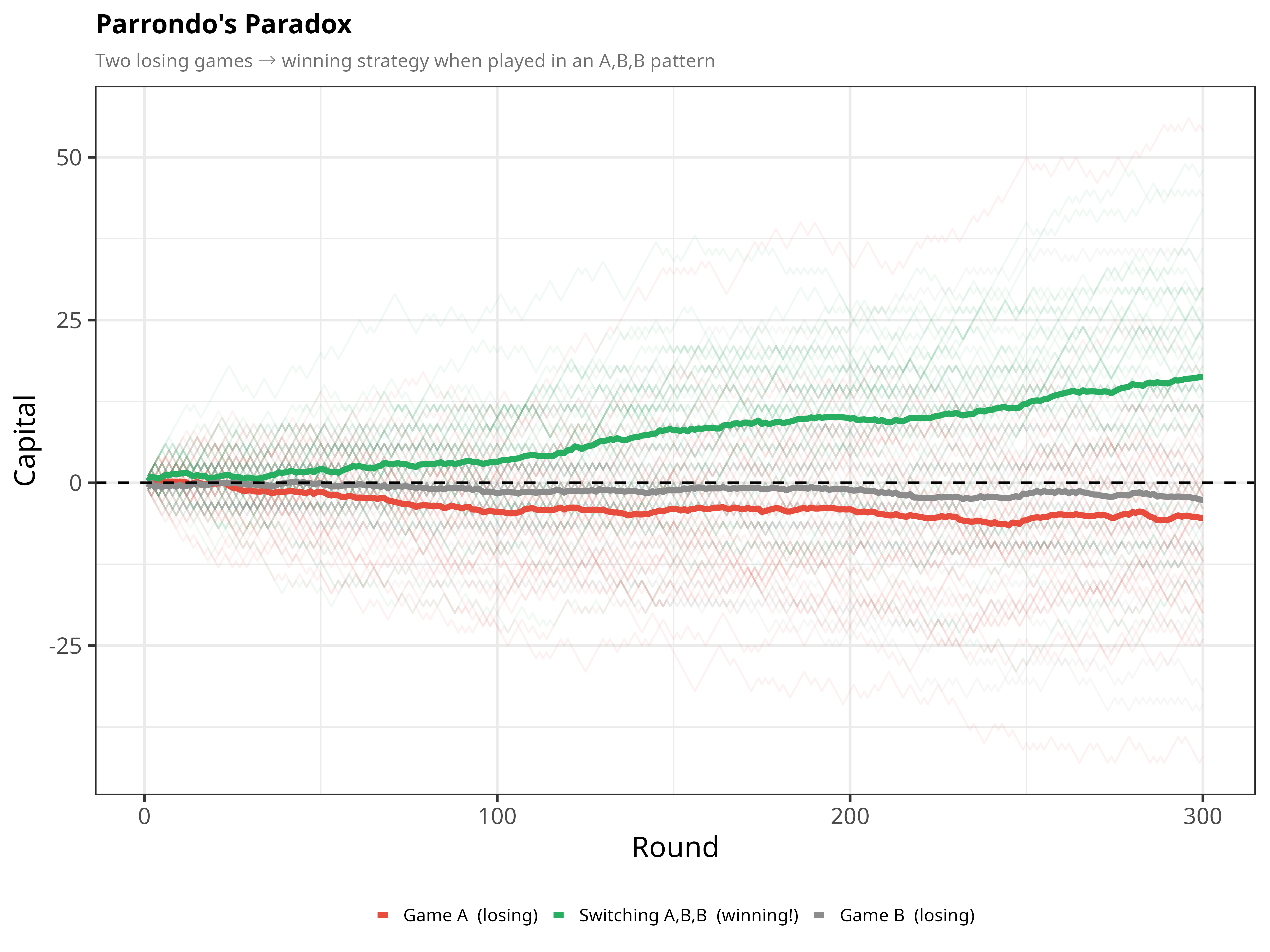
**The idea:** Take two gambling games that are each, individually, rigged to
lose money on average. Now switch between them in a fixed pattern (A, B, B, A,
B, B, ...). Astonishingly, the combined strategy can *win* over time. This
happens because Game B's odds depend on your current capital (whether it is a
multiple of 3), and the moves made in Game A knock your capital out of Game B's
unfavorable state more often than Game B alone would — their interaction
creates an opportunity that neither game has on its own.
```{r parrondo, fig.width=8}
play_game <- function(game, capital) {
  p <- if (game == "A") 0.495 else if (capital %% 3 == 0) 0.095 else 0.745
  capital + if (runif(1) < p) 1L else -1L
}

run_strat <- function(strategy, rounds = 300) {
  cap <- 0L
  sapply(seq_len(rounds), function(i) {
    g <- if (strategy == "A") "A"
    else if (strategy == "B") "B"
    else if (i %% 3 == 1) "A" else "B"   # repeating A, B, B pattern
    cap <<- play_game(g, cap)
    cap
  })
}

n_sims <- 40
par_dat <- do.call(rbind, lapply(c("A", "B", "A+B (ABB pattern)"), function(strat) {
  do.call(rbind, lapply(seq_len(n_sims), function(s) {
    set.seed(s * 17)
    data.frame(round = seq_len(300), capital = run_strat(strat),
               sim = s, strategy = strat)
  }))
}))
par_mean <- aggregate(capital ~ round + strategy, par_dat, mean)
end_cap  <- with(par_mean[par_mean$round == 300, ], setNames(capital, strategy))

p3 <- ggplot(par_dat, aes(round, capital,
                          group = interaction(sim, strategy), color = strategy)) +
  geom_line(alpha = 0.07, linewidth = 0.4) +
  geom_line(data = par_mean, aes(group = strategy), linewidth = 1.3) +
  geom_hline(yintercept = 0, linetype = "dashed", color = "black", linewidth = 0.6) +
  scale_color_manual(
    values = c("A" = C1, "B" = CG, "A+B (ABB pattern)" = C3),
    labels = c("A" = "Game A  (losing)", "B" = "Game B  (losing)",
               "A+B (ABB pattern)" = "Switching A,B,B  (winning!)")
  ) +
  labs(title = "Parrondo's Paradox",
       subtitle = "Two losing games → winning strategy when played in an A,B,B pattern",
       x = "Round", y = "Capital", color = NULL) + t

p3
```
Both Game A (red) and Game B (grey) drift below zero on average — they're
losing propositions on their own (average capital after 300 rounds:
`r end_cap["A"]` and `r end_cap["B"]`). But playing them in the repeating
pattern A, B, B (green) climbs upward, to `r end_cap["A+B (ABB pattern)"]`
after 300 rounds. Note that simple one-for-one alternation (ABAB) is not
enough with these parameters: it still loses slightly. Combining two "bad"
strategies can beat either one alone.
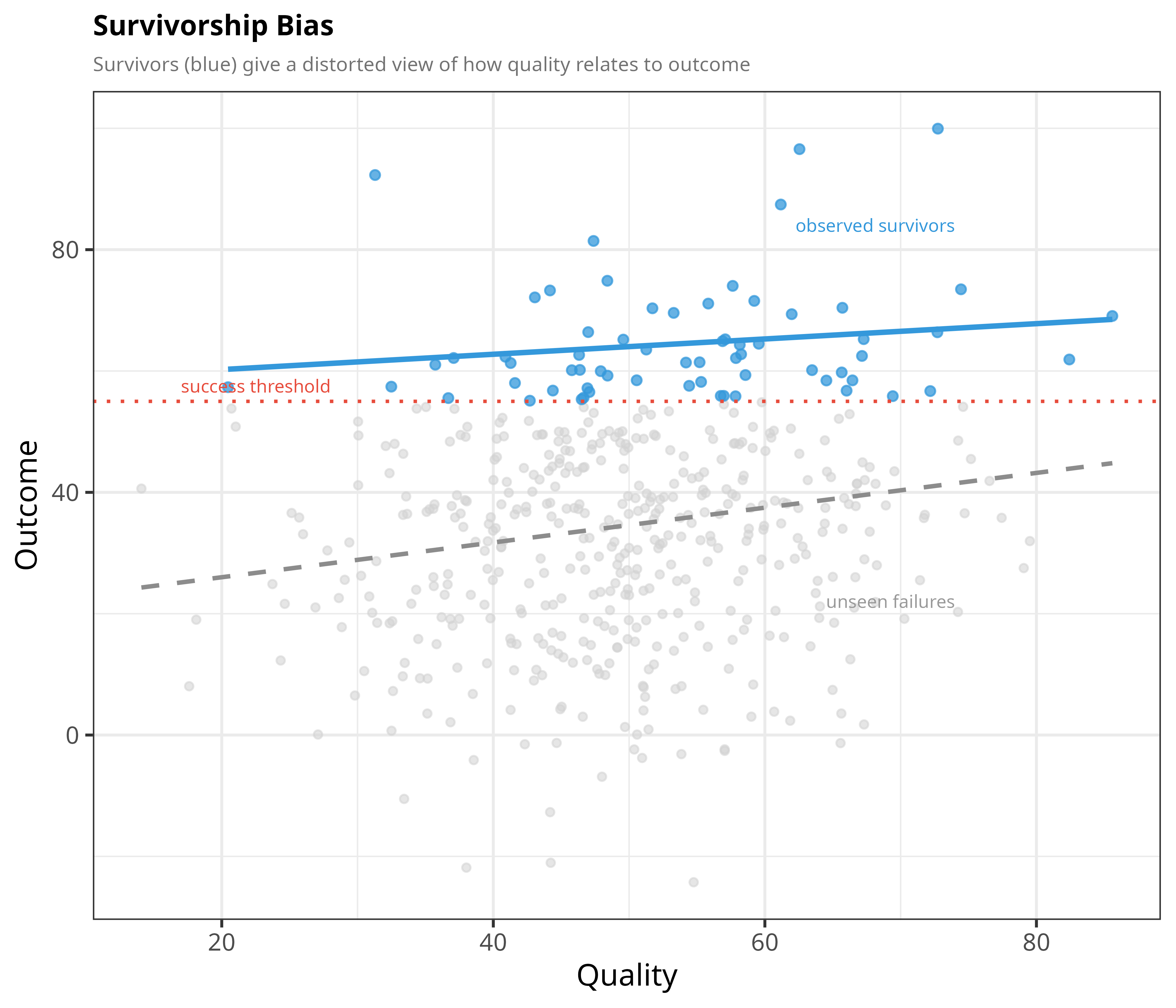
# Survivorship Bias
**The idea:** If you only study the winners — the WWII planes that made it
back to base, the startups that became famous, the people who "made it" —
you get a distorted picture of what actually causes success, because the
failures that could tell a different story are invisible to you. Here,
"outcome" depends partly on quality and partly on luck, but if we only look at
data points that crossed a "survived" threshold, the relationship between
quality and outcome is distorted — in this case it is flattened, because
low-quality survivors are exactly the ones who got very lucky.
```{r survivorship}
set.seed(42)
n_surv <- 500
quality <- rnorm(n_surv, 50, 12)
luck    <- rnorm(n_surv, 0, 18)
outcome <- 0.3 * quality + luck + 20
sv_dat  <- data.frame(quality, outcome, survived = outcome > 55)
b_all   <- coef(lm(outcome ~ quality, sv_dat))[[2]]
b_sv    <- coef(lm(outcome ~ quality, subset(sv_dat, survived)))[[2]]

p4 <- ggplot(sv_dat, aes(quality, outcome)) +
  geom_point(data = subset(sv_dat, !survived),
             color = "grey82", size = 1.3, alpha = 0.55) +
  geom_point(data = subset(sv_dat, survived),
             color = C2, size = 1.6, alpha = 0.75) +
  geom_smooth(method = "lm", se = FALSE, color = CG,
              linetype = "dashed", linewidth = 0.9) +
  geom_smooth(data = subset(sv_dat, survived),
              method = "lm", se = FALSE, color = C2, linewidth = 1.1) +
  geom_hline(yintercept = 55, linetype = "dotted", color = C1, linewidth = 0.7) +
  annotate("text", x = 17, y = 57.5, hjust = 0, size = 2.7, color = C1,
           label = "success threshold") +
  annotate("text", x = 74, y = 22,  hjust = 1, size = 2.7, color = "grey60",
           label = "unseen failures") +
  annotate("text", x = 74, y = 84,  hjust = 1, size = 2.7, color = C2,
           label = "observed survivors") +
  labs(title = "Survivorship Bias",
       subtitle = "Survivors (blue) give a distorted view of how quality relates to outcome",
       x = "Quality", y = "Outcome") + t

p4
```
Looking only at the blue "survivors," quality barely seems to matter (the
solid blue line is nearly flat, slope ≈ `r round(b_sv,2)`). Across *everyone*,
including the grey failures, the true slope (dashed line) is more than twice as
steep (≈ `r round(b_all,2)`). Judging only by survivors gives a distorted
picture: their outcomes are inflated by luck, which hides how quality really
relates to outcome.
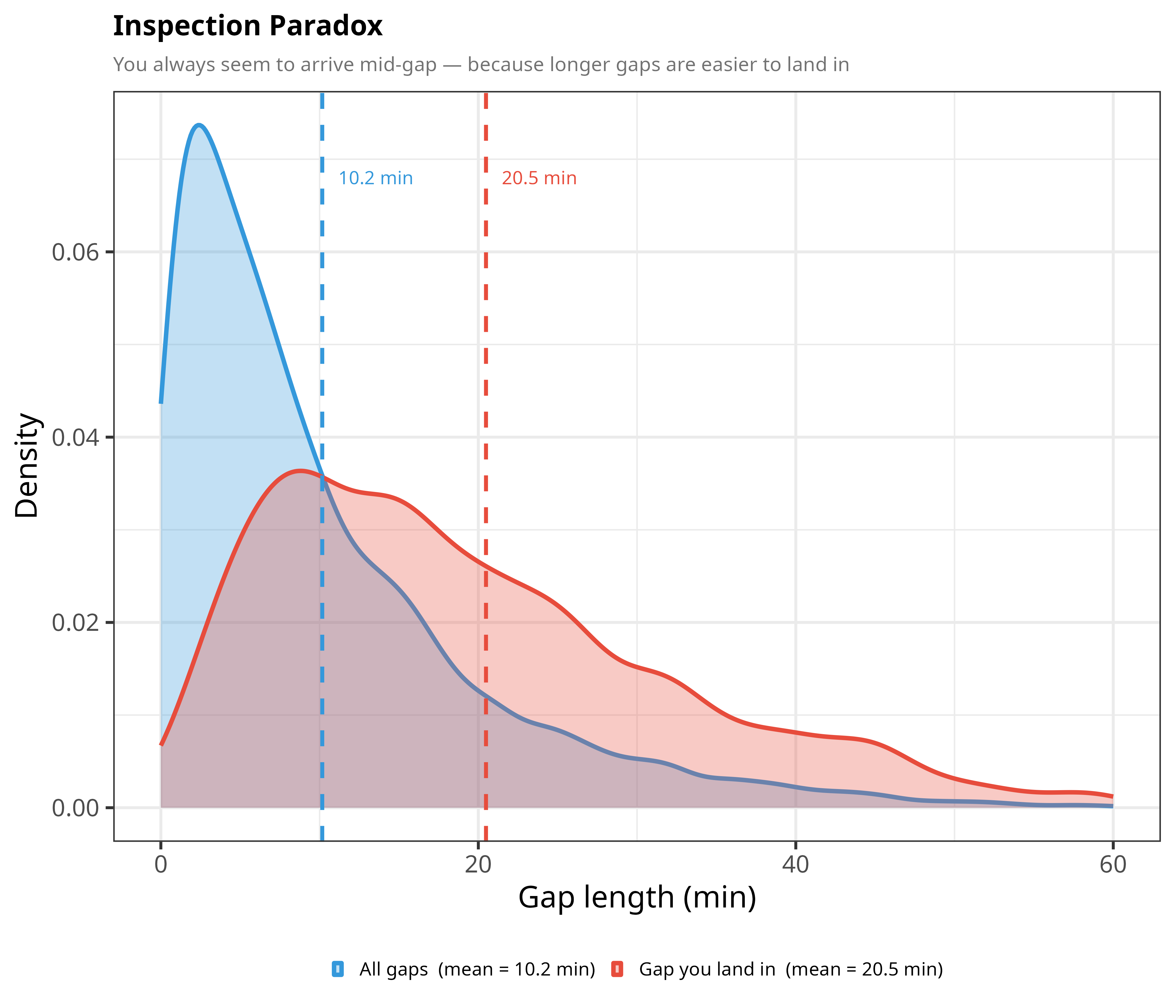
# Inspection Paradox
**The idea:** If buses arrive randomly with an average gap of 10 minutes
between them, and you show up at a random moment, your *expected* wait is not
5 minutes (half the average gap) but the full 10 minutes, because the gap you
land in averages about 20 minutes. Why? Because you're more likely to arrive
during a long gap than a short one — long gaps simply take up more clock time,
so they're easier to "land in." This is why your personal experience of
waiting always seems worse than the average would suggest.
```{r inspection}
set.seed(42)
n_gaps  <- 4000
gap_all <- rexp(n_gaps, rate = 1 / 10)
gap_hit <- sample(gap_all, n_gaps, replace = TRUE, prob = gap_all / sum(gap_all))

insp_dat <- data.frame(
  gap    = c(gap_all, gap_hit),
  source = rep(c(paste0("All gaps  (mean = ", round(mean(gap_all), 1), " min)"),
                 paste0("Gap you land in  (mean = ", round(mean(gap_hit), 1), " min)")),
               each = n_gaps)
)

p5 <- ggplot(insp_dat, aes(gap, fill = source, color = source)) +
  geom_density(alpha = 0.30, linewidth = 0.9) +
  geom_vline(aes(xintercept = mean(gap_all)), color = C2,
             linetype = "dashed", linewidth = 0.8) +
  geom_vline(aes(xintercept = mean(gap_hit)), color = C1,
             linetype = "dashed", linewidth = 0.8) +
  annotate("text", x = mean(gap_all) + 1, y = 0.068,
           label = paste0(round(mean(gap_all), 1), " min"), hjust = 0,
           size = 2.8, color = C2) +
  annotate("text", x = mean(gap_hit) + 1, y = 0.068,
           label = paste0(round(mean(gap_hit), 1), " min"), hjust = 0,
           size = 2.8, color = C1) +
  scale_x_continuous(limits = c(0, 60)) +
  scale_fill_manual( values = c(C2, C1), name = NULL) +
  scale_color_manual(values = c(C2, C1), name = NULL) +
  labs(title = "Inspection Paradox",
       subtitle = "You always seem to arrive mid-gap — because longer gaps are easier to land in",
       x = "Gap length (min)", y = "Density") + t

p5
```
The blue curve is the true distribution of gaps between buses (mean ≈
`r round(mean(gap_all),1)` minutes). The red curve is the distribution of gaps
that a random arrival actually experiences (mean ≈ `r round(mean(gap_hit),1)`
minutes, about double) — shifted noticeably to the right, because random
arrivals are "size-biased" toward longer gaps.
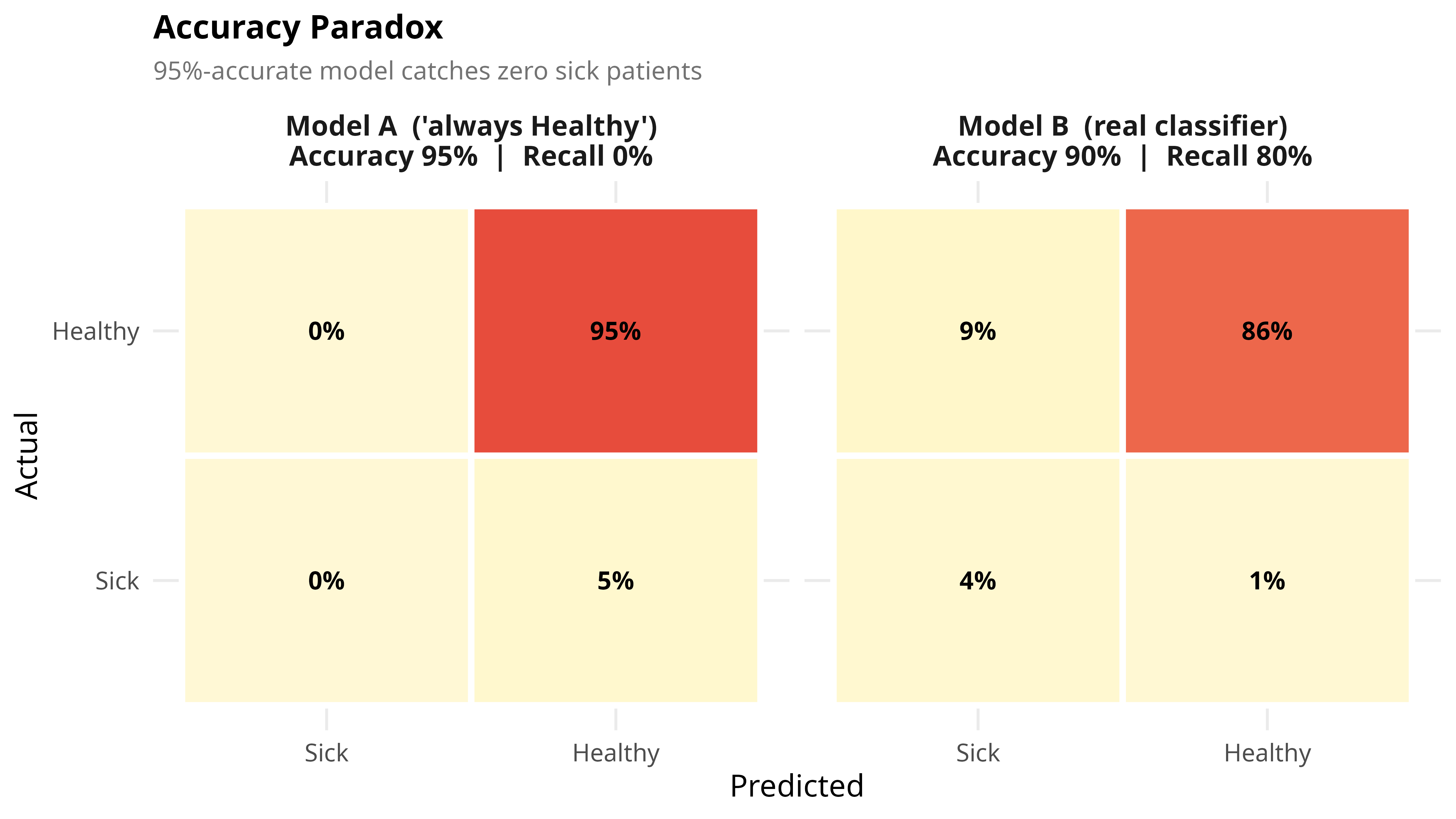
# Accuracy Paradox
**The idea:** When one outcome is much more common than the other (e.g. most
patients are healthy), a model can score very high "accuracy" while being
completely useless. A model that always predicts "healthy" will be right 95%
of the time if 95% of patients truly are healthy — while catching exactly zero
of the actual sick patients. Accuracy alone can hide a model that provides no
real value; you need to also look at recall (how many true cases it actually
catches).
```{r accuracy, fig.width=8, fig.height=4.5}
make_cm <- function(tp, fp, tn, fn, model_label) {
  total <- tp + fp + tn + fn
  data.frame(
    actual    = factor(c("Sick","Sick","Healthy","Healthy"),
                       levels = c("Sick","Healthy")),
    predicted = factor(c("Sick","Healthy","Sick","Healthy"),
                       levels = c("Sick","Healthy")),
    pct       = round(c(tp, fn, fp, tn) / total * 100, 1),
    model     = model_label
  )
}

acc_dat <- rbind(
  make_cm(0, 0, 9500, 500,
          "Model A  ('always Healthy')\nAccuracy 95%  |  Recall 0%"),
  make_cm(400, 900, 8600, 100,
          "Model B  (real classifier)\nAccuracy 90%  |  Recall 80%")
)

p6 <- ggplot(acc_dat, aes(predicted, actual, fill = pct)) +
  geom_tile(color = "white", linewidth = 1.2) +
  geom_text(aes(label = paste0(pct, "%")), size = 3.5, fontface = "bold") +
  facet_wrap(~model) +
  scale_fill_gradient2(low = "white", mid = "#FFF3B0",
                       high = C1, midpoint = 30,
                       name = "% of total") +
  labs(title = "Accuracy Paradox",
       subtitle = "95%-accurate model catches zero sick patients",
       x = "Predicted", y = "Actual") +
  theme_minimal(base_size = 12) +
  theme(plot.title      = element_text(face = "bold", size = 13),
        plot.subtitle   = element_text(color = "grey45", size = 10),
        strip.text      = element_text(size = 11, face = "bold"),
        legend.position = "none")

p6
```
Model A boasts 95% accuracy but its "Sick / Predicted Sick" cell is 0% — it
never identifies a single sick patient. Model B has *lower* accuracy (90%)
but is actually useful, correctly flagging 80% of sick patients. Never judge a
classifier by accuracy alone when classes are imbalanced.
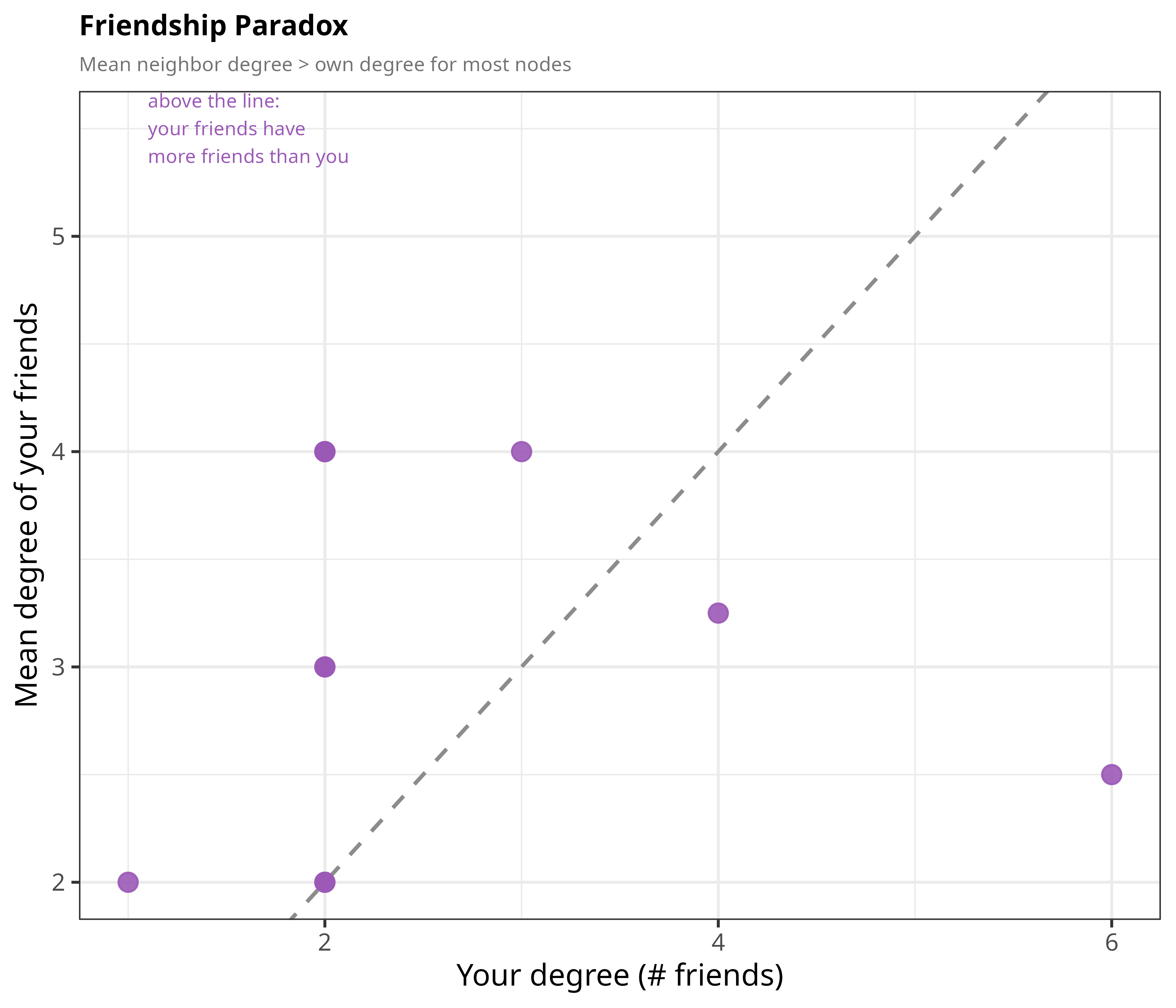
# Friendship Paradox
**The idea:** On average, your friends have more friends than you do. This
isn't a comment on your popularity — it's a mathematical property of
networks. Highly-connected people show up in *many* people's friend lists, so
when you average "how many friends does my friend have," those popular people
get counted repeatedly and pull the average up.
```{r friendship}
edges_fp <- data.frame(
  a = c(1,1,1,1,1,1,2,2,3,3,4,5,6,7,8),
  b = c(2,3,4,5,6,7,3,8,9,10,9,10,11,11,12)
)
all_n <- 1:12
deg   <- sapply(all_n, function(v) sum(edges_fp$a == v | edges_fp$b == v))

fp_dat <- data.frame(
  own = deg,
  mean_nbr = sapply(all_n, function(v) {
    nb <- union(edges_fp$b[edges_fp$a == v], edges_fp$a[edges_fp$b == v])
    if (!length(nb)) return(NA)
    mean(deg[nb])
  })
)
fp_dat <- na.omit(fp_dat)

p7 <- ggplot(fp_dat, aes(own, mean_nbr)) +
  geom_abline(slope = 1, intercept = 0, linetype = "dashed",
              color = CG, linewidth = 0.8) +
  geom_point(color = C4, size = 3.5, alpha = 0.9) +
  annotate("text", x = 1.1, y = 5.5, hjust = 0, size = 2.9, color = C4,
           label = "above the line:\nyour friends have\nmore friends than you") +
  labs(title = "Friendship Paradox",
       subtitle = "Mean neighbor degree > own degree for most nodes",
       x = "Your degree (# friends)",
       y = "Mean degree of your friends") + t

p7
```
Most points (8 of 12 people; several overlap) sit above the dashed diagonal
line, meaning their friends have more connections than they do. Only the two
most-connected people (degree 4 and 6, at the far right) fall below it, and two
people sit exactly on it.
# Braess's Paradox
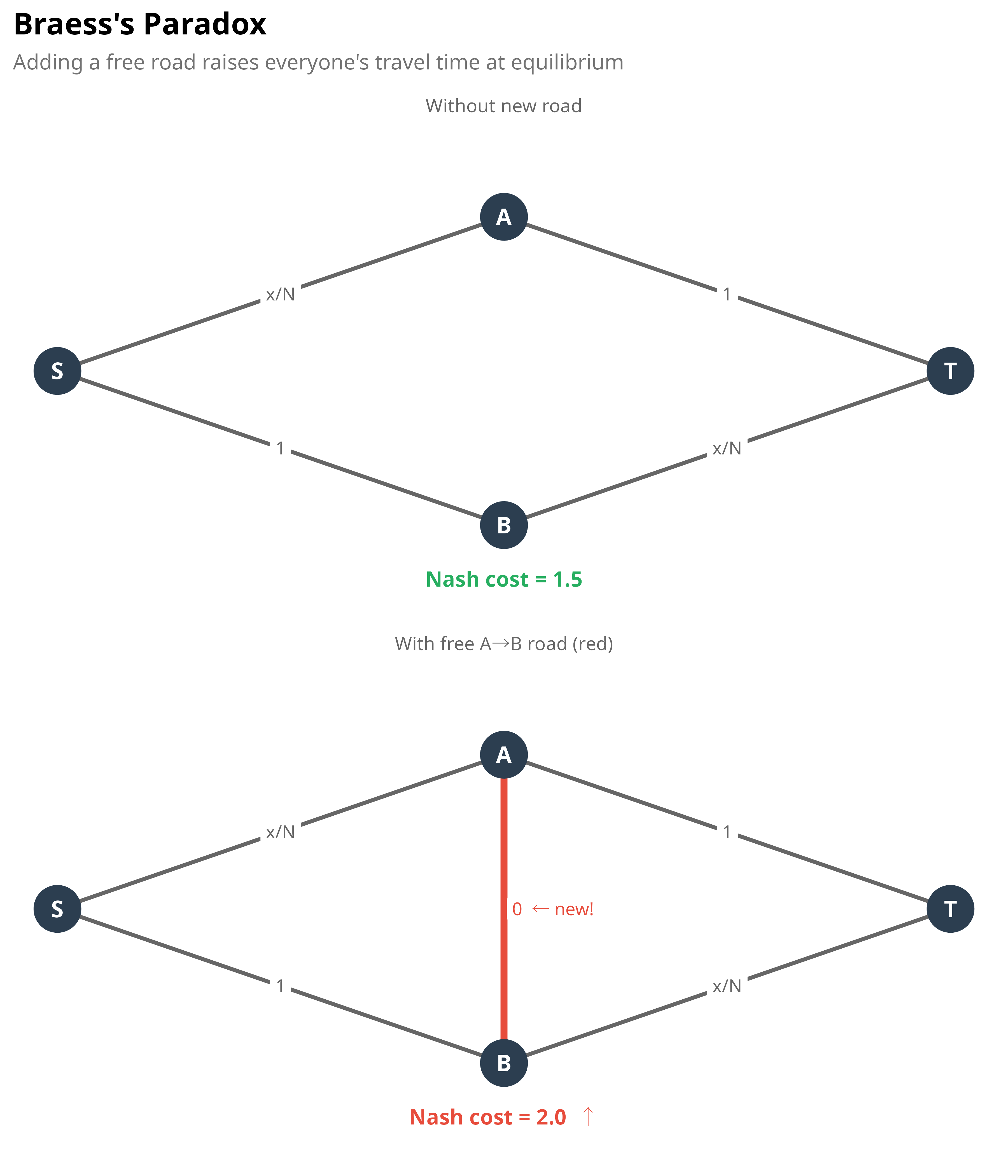
**The idea:** Adding a brand-new, free shortcut to a road network can make
traffic *worse* for everyone. This happens because every driver selfishly
picks whatever looks like the fastest route for themselves; once the new road
exists, enough drivers pile onto it that it creates a new bottleneck, and the
system settles into a "Nash equilibrium" where everyone's total travel time is
higher than before the shortcut existed.
```{r braess, fig.width=6, fig.height=7}
nodes_b <- data.frame(x = c(0,2,2,4), y = c(1,2,0,1), lbl = c("S","A","B","T"))

segs_before <- data.frame(
  x=c(0,2,0,2), y=c(1,2,1,0), xend=c(2,4,2,4), yend=c(2,1,0,1),
  cost=c("x/N","1","1","x/N"), new=FALSE
)
segs_after <- rbind(segs_before,
                    data.frame(x=2,y=2,xend=2,yend=0,cost="0  ← new!",new=TRUE)
)

make_net <- function(segs, nodes, title_str, cost_str, cost_col) {
  ggplot() +
    geom_segment(data = segs,
                 aes(x,y,xend=xend,yend=yend,color=new,linewidth=new),
                 arrow = arrow(length=unit(0.18,"cm"),type="closed")) +
    geom_label(data = segs,
               aes((x+xend)/2 + ifelse(cost=="0  ← new!", 0.22, 0),
                   (y+yend)/2 + ifelse(cost=="0  ← new!", 0, 0),
                   label=cost, color=new),
               size=2.7, label.size=0, fill="white") +
    geom_point(data=nodes, aes(x,y), size=9, color="#2C3E50") +
    geom_text(data=nodes, aes(x,y,label=lbl),
              color="white", fontface="bold", size=3.5) +
    annotate("text", x=2, y=-0.35, label=cost_str, hjust=0.5,
             size=3.2, fontface="bold", color=cost_col) +
    scale_color_manual(values=c(`FALSE`="grey40",`TRUE`=C1), guide="none") +
    scale_linewidth_manual(values=c(`FALSE`=0.8,`TRUE`=1.4), guide="none") +
    coord_cartesian(ylim=c(-0.5, 2.5)) +
    labs(subtitle=title_str) +
    theme_void(base_size=10) +
    theme(plot.subtitle=element_text(color="grey40",size=8,hjust=0.5))
}

net1 <- make_net(segs_before, nodes_b, "Without new road", "Nash cost = 1.5", C3)
net2 <- make_net(segs_after,  nodes_b, "With free A→B road (red)", "Nash cost = 2.0  ↑", C1)

p8 <- (net1 / net2) +
  plot_annotation(
    title    = "Braess's Paradox",
    subtitle = "Adding a free road raises everyone's travel time at equilibrium",
    theme    = theme(
      plot.title    = element_text(face="bold", size=13),
      plot.subtitle = element_text(color="grey45", size=9)
    )
  )

p8
```
In the top network, drivers split evenly between the two routes (S→A→T and
S→B→T), each taking 1.5 units of time. Once the free A→B shortcut is added
(bottom), it becomes individually rational for everyone to route through it —
but that congests the shared `x/N` segments, and the equilibrium travel time
rises to 2.0 for everyone. More capacity, worse outcome — because no single
driver has an incentive to avoid the "shortcut" unilaterally.
# P-hacking / Multiple Comparisons
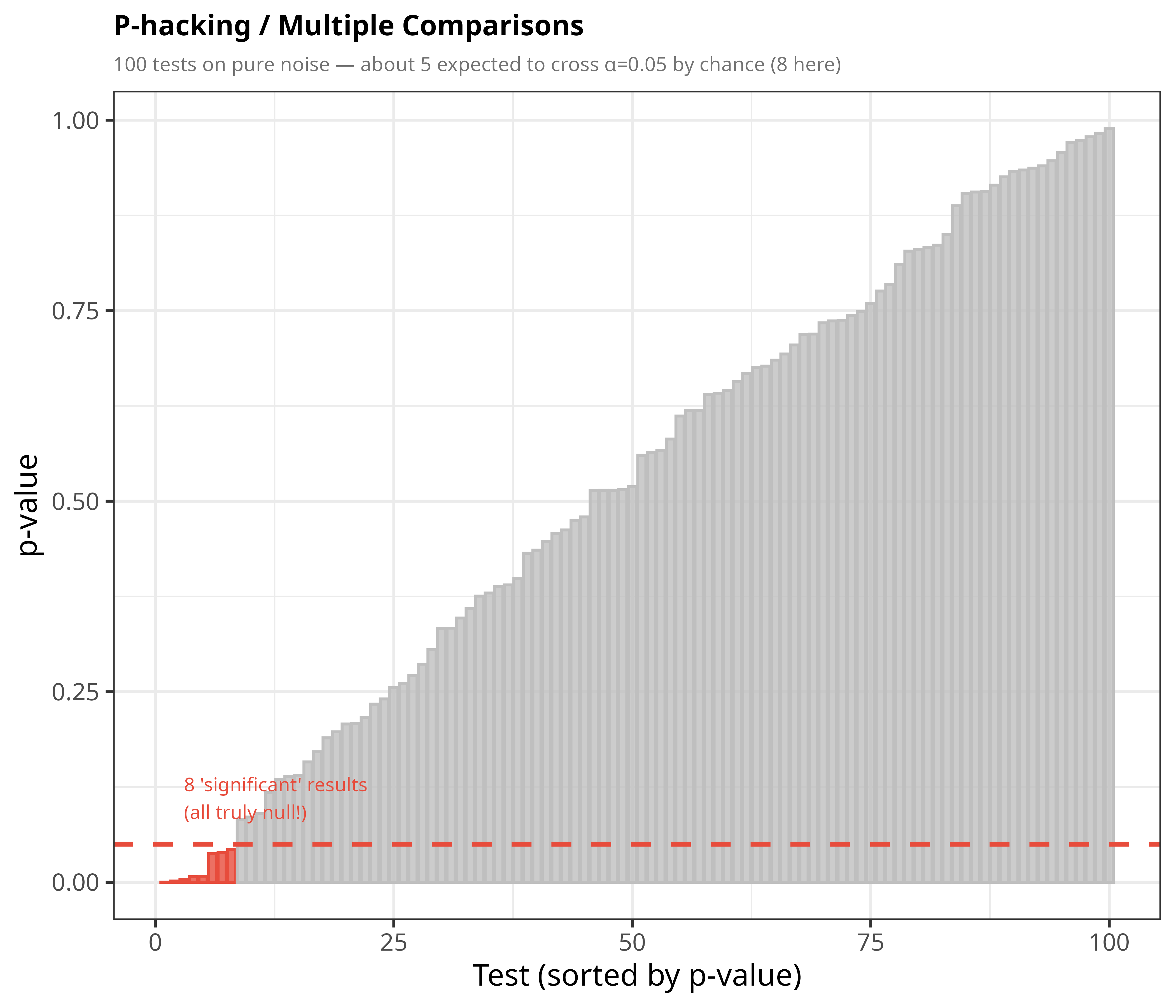
**The idea:** If you run 100 statistical tests on data that has *no real
effect at all*, roughly 5 of them will still come out "statistically
significant" purely by chance, if you use the standard 5% significance
threshold. This is exactly what that threshold means: a 5% chance of a false
alarm on any single test. Run enough tests and cherry-pick the "significant"
ones without accounting for how many tests you ran, and you'll "discover"
effects that are pure noise. This is a major reason many published findings
fail to replicate.
```{r p-hacking}
set.seed(42)
n_tests <- 100
pv      <- sort(runif(n_tests))
ph_dat  <- data.frame(rank = seq_len(n_tests), p = pv, sig = pv < 0.05)

p9 <- ggplot(ph_dat, aes(rank, p, fill = sig, color = sig)) +
  geom_col(width = 0.85, alpha = 0.8) +
  geom_hline(yintercept = 0.05, color = C1, linewidth = 1, linetype = "dashed") +
  scale_fill_manual( values = c(`TRUE` = C1, `FALSE` = "grey75"), guide = "none") +
  scale_color_manual(values = c(`TRUE` = C1, `FALSE` = "grey75"), guide = "none") +
  annotate("text", x = 3, y = 0.11, hjust = 0, size = 2.9, color = C1,
           label = paste0(sum(ph_dat$sig), " 'significant' results\n(all truly null!)")) +
  labs(title = "P-hacking / Multiple Comparisons",
       subtitle = paste0("100 tests on pure noise — about 5 expected to cross α=0.05 by chance (",
                         sum(ph_dat$sig), " here)"),
       x = "Test (sorted by p-value)", y = "p-value") + t

p9
```
None of these 100 tests reflect a real effect — the underlying data was pure
random noise. Yet a handful of bars dip below the red 0.05 threshold purely by
chance, and in a real analysis those would be the ones that get reported as
"significant findings" if you didn't correct for the number of tests run.
# Takeaway
Every one of these graphs shows the same underlying warning: **statistics
computed on data can mislead you unless you understand how the data was
grouped, selected, filtered, or compared.** Aggregation, selection bias,
imbalanced classes, restricted ranges, and repeated testing can all make a
relationship appear, disappear, or reverse — without any single number
"lying" on its own. The fix is always the same: look at the full picture, plot
your data, and think carefully about how it was collected before trusting a
summary statistic.