---
title: "Recreating Hans Rosling's Bubble Chart in R"
author: ""
output:
html_document:
css: styles.css
theme: flatly
highlight: tango
toc: true
toc_float: true
code_folding: show
self_contained: true
---
```{r setup, include=FALSE}
directory<-if (rstudioapi::isAvailable()) paste0(dirname(rstudioapi::getActiveDocumentContext()$path),"/") else ""
source(paste0(directory, "R/code_options.R"))
source(paste0(directory, "R/code_rwf.R"))
```
## What is this?
In 2006, Hans Rosling gave [a TED talk](https://www.ted.com/talks/hans_rosling_the_best_stats_you_ve_ever_seen) that changed how people think about global development. His animated bubble chart showed 200 years of data in 4 minutes, revealing that the world is far less divided between "rich" and "poor" than most people assume.
This tutorial shows you how to recreate that chart in R using freely available packages — no API keys, no paid data, just a few lines of code.
---
## Packages
```{r packages}
# install.packages(c("gapminder", "ggplot2", "gganimate", "gifski", "scales"))

library(gapminder)   # the data
library(ggplot2)     # plotting
library(gganimate)   # animation
library(gifski)      # GIF renderer
library(scales)      # axis formatting

data(gapminder)
```
---
## The data
The `gapminder` package ships with a clean, ready-to-use dataset. No downloading required.
```{r data}
head(gapminder, 12)
```
It covers **`r length(unique(gapminder$country))`** countries across **`r length(unique(gapminder$continent))`** continents, with observations every 5 years from **`r min(gapminder$year)`** to **`r max(gapminder$year)`**.
Each row is one country in one year, with:
| Column | Description |
|--------|-------------|
| `country` | Country name |
| `continent` | Continent |
| `year` | Year (every 5 years) |
| `lifeExp` | Life expectancy at birth |
| `pop` | Population |
| `gdpPercap` | GDP per capita (inflation-adjusted USD) |
---
## Building the chart step by step
### Step 1 — the basic scatter
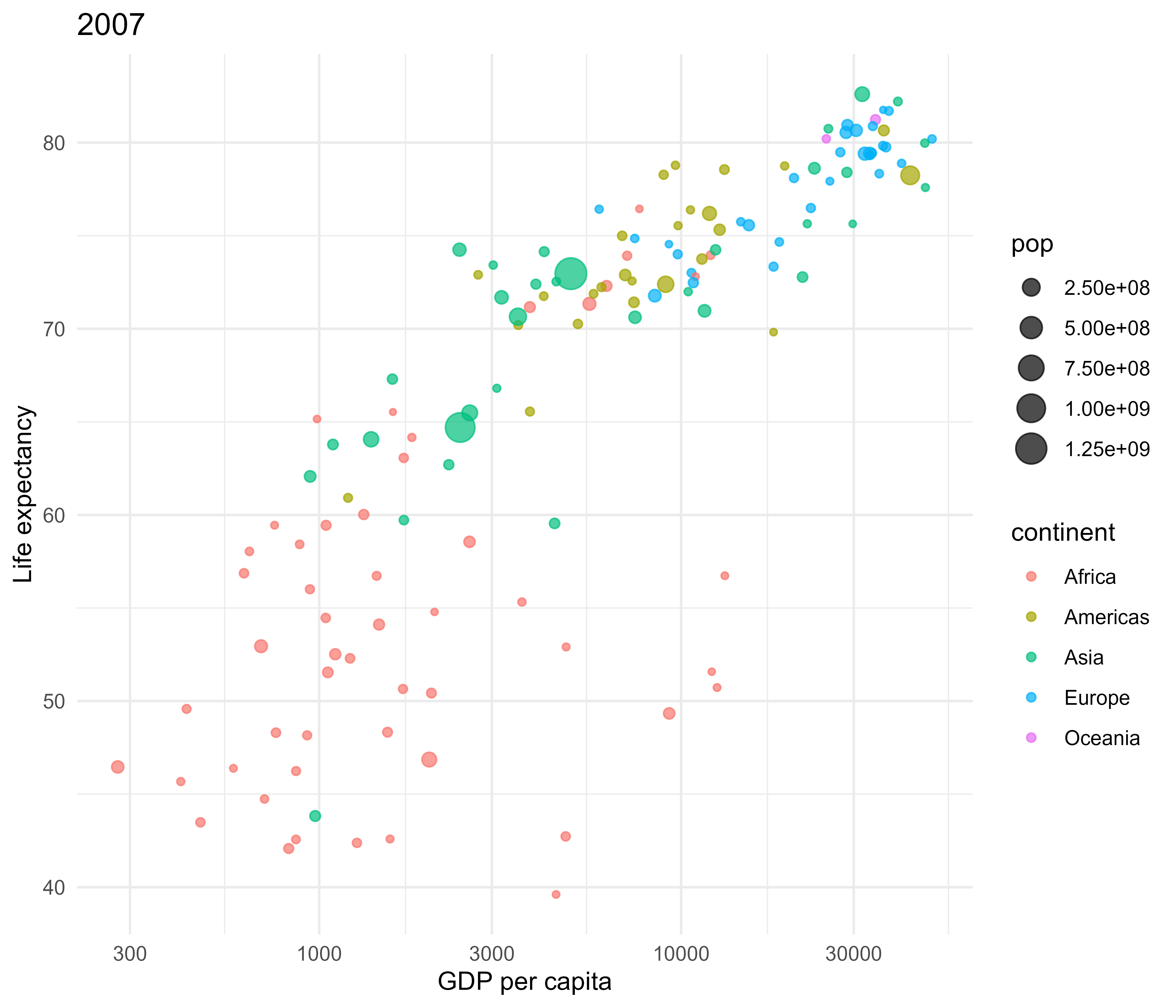
Start with a single year to get the layout right before adding animation.
```{r static}
gapminder_2007 <- gapminder[gapminder$year == 2007, ]

ggplot(gapminder_2007,
       aes(x = gdpPercap, y = lifeExp, size = pop, color = continent)) +
  geom_point(alpha = 0.7) +
  scale_x_log10() +
  labs(title = "2007", x = "GDP per capita", y = "Life expectancy") +
  theme_minimal()
```
Three things are already encoded: wealth (x), health (y), and population (bubble size). Continent gets color.
### Step 2 — improve the axes
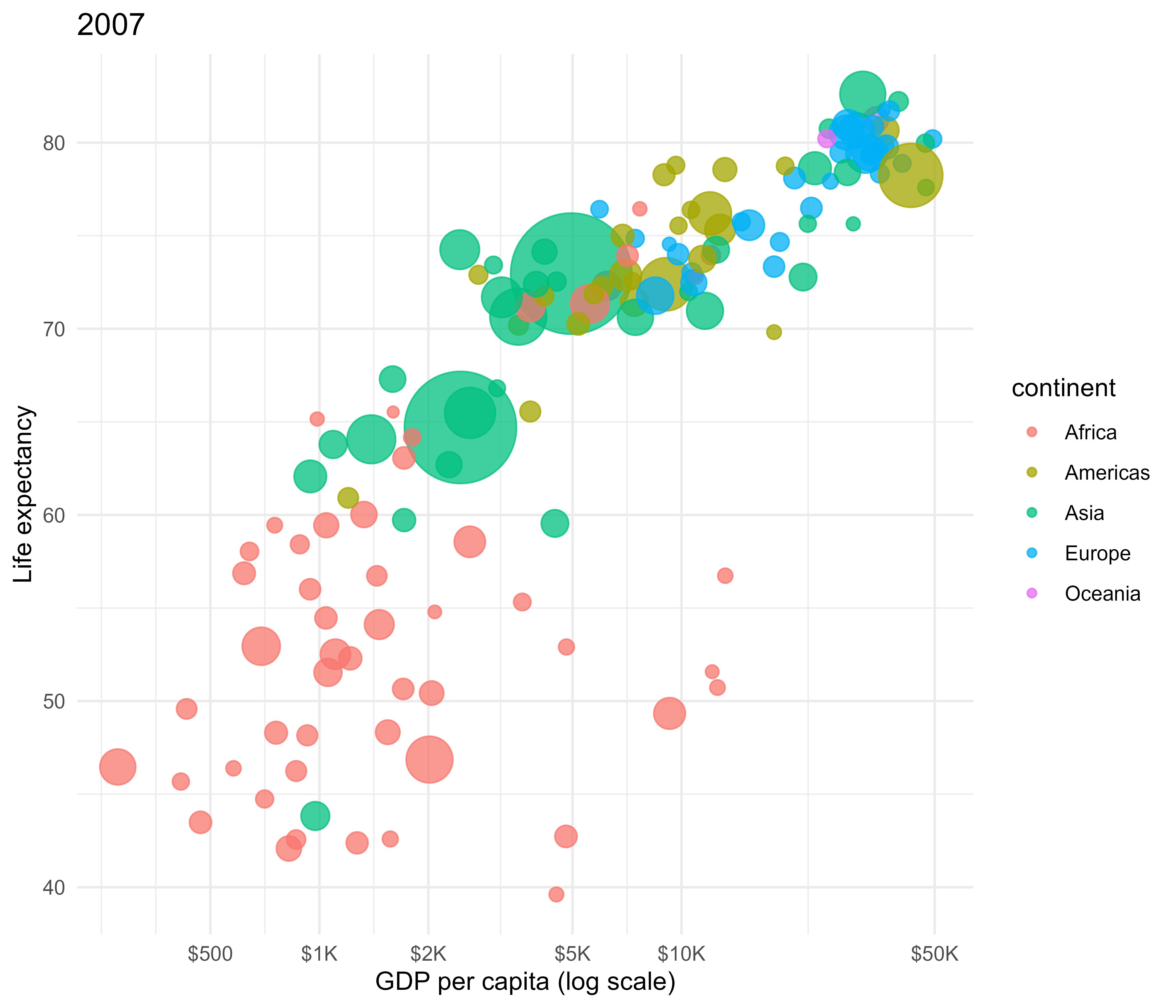
GDP per capita spans from ~$200 to ~$100,000. A **log scale** is essential — on a linear scale, poor countries are crushed into the left margin and you lose all the variation that matters.
```{r log_scale}
ggplot(gapminder_2007,
       aes(x = gdpPercap, y = lifeExp, size = pop, color = continent)) +
  geom_point(alpha = 0.75) +
  scale_x_log10(
    breaks = c(500, 1000, 2000, 5000, 10000, 50000),
    labels = label_dollar(scale_cut = cut_short_scale())
  ) +
  scale_size(range = c(2, 24), guide = "none") +
  labs(title = "2007", x = "GDP per capita (log scale)", y = "Life expectancy") +
  theme_minimal()
```
`range = c(2, 24)` in `scale_size` maps the smallest population to a 2px bubble and the largest (China, India) to 24px. The `guide = "none"` removes the size legend — it's not readable anyway.
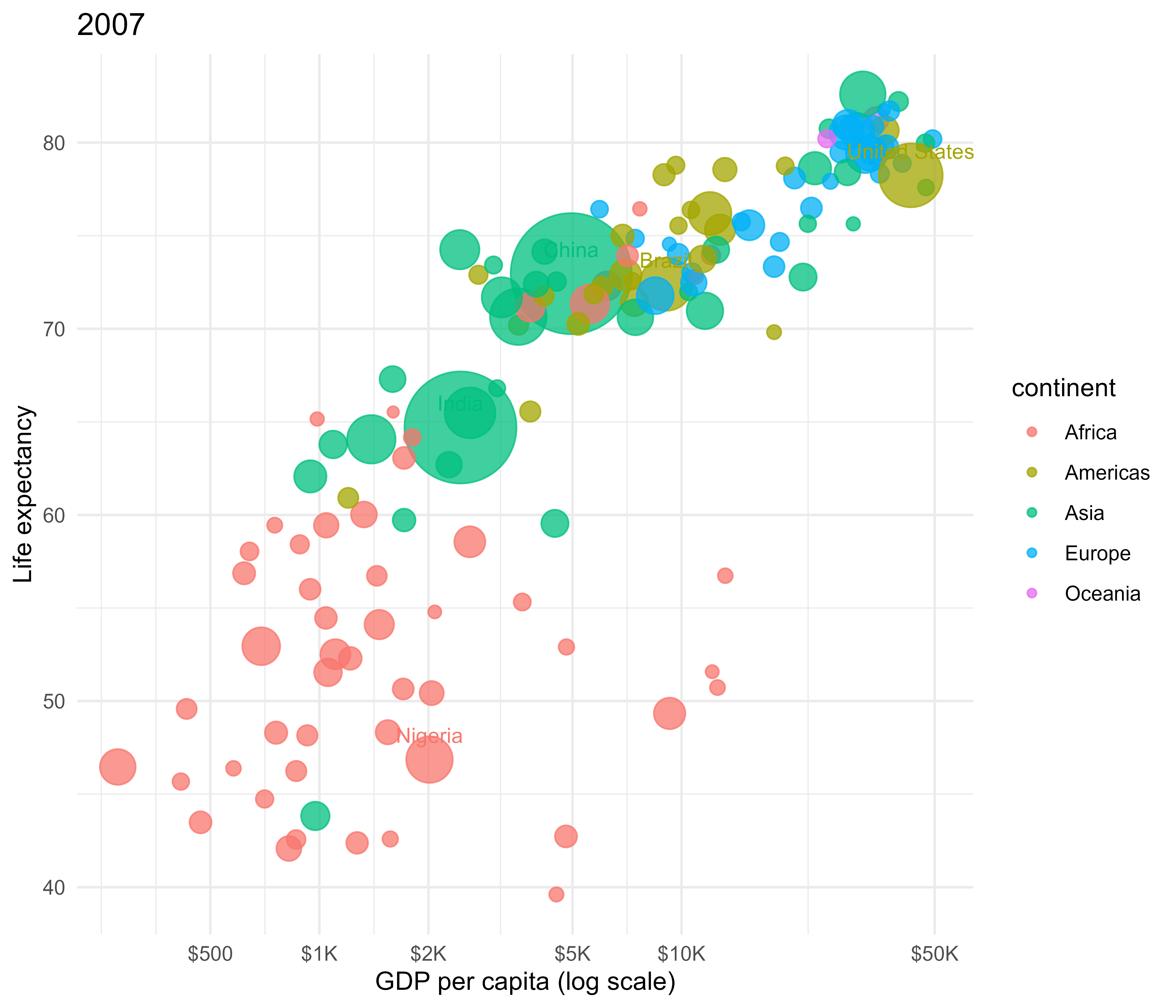
### Step 3 — label the big ones
```{r labels}
big_countries <- c("China", "India", "United States", "Brazil", "Nigeria")

ggplot(gapminder_2007,
       aes(x = gdpPercap, y = lifeExp, size = pop, color = continent)) +
  geom_point(alpha = 0.75) +
  geom_text(
    data = \(d) d[d$country %in% big_countries, ],
    aes(label = country),
    size = 3.2, vjust = -1.1, show.legend = FALSE
  ) +
  scale_x_log10(
    breaks = c(500, 1000, 2000, 5000, 10000, 50000),
    labels = label_dollar(scale_cut = cut_short_scale())
  ) +
  scale_size(range = c(2, 24), guide = "none") +
  labs(title = "2007", x = "GDP per capita (log scale)", y = "Life expectancy") +
  theme_minimal()
```
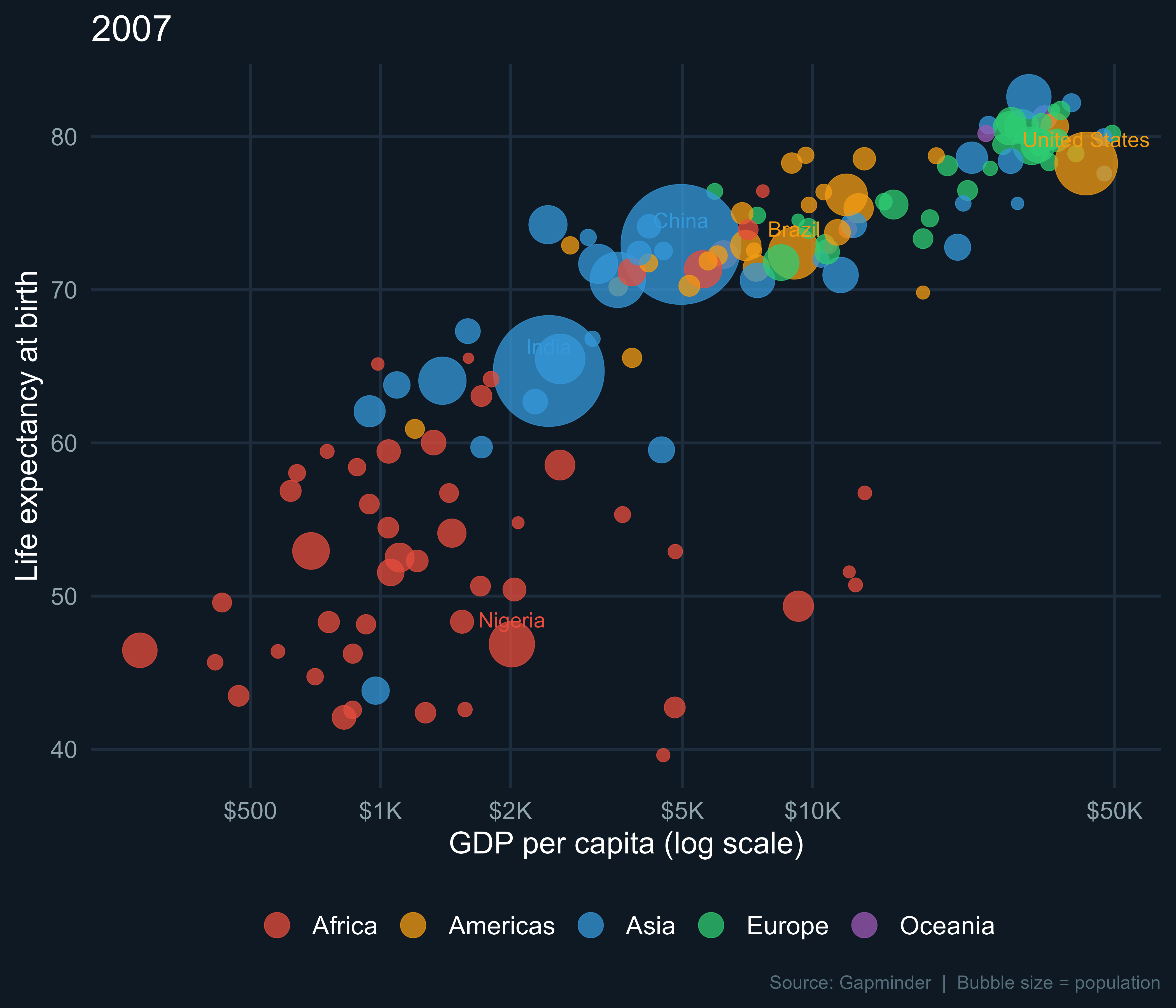
### Step 4 — dark theme + colors
```{r theme}
continent_colors <- c(
  Africa   = "#E74C3C",
  Americas = "#F39C12",
  Asia     = "#3498DB",
  Europe   = "#2ECC71",
  Oceania  = "#9B59B6"
)

dark_theme <- theme_minimal(base_size = 13) +
  theme(
    plot.background  = element_rect(fill = "#0F1923", color = NA),
    panel.background = element_rect(fill = "#0F1923", color = NA),
    panel.grid.major = element_line(color = "#1E2D3D"),
    panel.grid.minor = element_blank(),
    text             = element_text(color = "white"),
    axis.text        = element_text(color = "#90A4AE"),
    legend.position  = "bottom",
    legend.text      = element_text(size = 11),
    plot.caption     = element_text(color = "#546E7A", size = 8, hjust = 1)
  )

ggplot(gapminder_2007,
       aes(x = gdpPercap, y = lifeExp, size = pop, color = continent)) +
  geom_point(alpha = 0.75, stroke = 0.2) +
  geom_text(
    data = \(d) d[d$country %in% big_countries, ],
    aes(label = country),
    size = 3.2, vjust = -1.1, show.legend = FALSE
  ) +
  scale_x_log10(
    breaks = c(500, 1000, 2000, 5000, 10000, 50000),
    labels = label_dollar(scale_cut = cut_short_scale())
  ) +
  scale_size(range = c(2, 24), guide = "none") +
  scale_color_manual(
    values = continent_colors,
    guide  = guide_legend(override.aes = list(size = 5))
  ) +
  labs(
    title   = "2007",
    x       = "GDP per capita (log scale)",
    y       = "Life expectancy at birth",
    color   = NULL,
    caption = "Source: Gapminder  |  Bubble size = population"
  ) +
  dark_theme
```
### Step 5 — animate it
`gganimate` extends ggplot2 with `transition_*` functions. `transition_time(year)` moves through the `year` variable. `shadow_mark()` leaves a faint ghost trail so you can see where countries have been.
```{r animate, eval=TRUE, cache=TRUE}
p <- ggplot(gapminder,
            aes(x = gdpPercap, y = lifeExp, size = pop, color = continent)) +

  geom_point(alpha = 0.75, stroke = 0.2) +

  geom_text(
    data = \(d) d[d$country %in% big_countries, ],
    aes(label = country),
    size = 3.2, vjust = -1.1, show.legend = FALSE
  ) +

  scale_x_log10(
    breaks = c(500, 1000, 2000, 5000, 10000, 50000),
    labels = label_dollar(scale_cut = cut_short_scale())
  ) +
  scale_size(range = c(2, 24), guide = "none") +
  scale_color_manual(
    values = continent_colors,
    guide  = guide_legend(override.aes = list(size = 5))
  ) +

  labs(
    title   = "{as.integer(frame_time)}",   # <-- the magic: year as title
    x       = "GDP per capita (log scale)",
    y       = "Life expectancy at birth",
    color   = NULL,
    caption = "Source: Gapminder  |  Bubble size = population"
  ) +

  dark_theme +
  theme(plot.title = element_text(size = 54, face = "bold", hjust = 0.5)) +

  transition_time(year) +      # animate over year
  ease_aes("linear") +         # constant speed between frames
  shadow_mark(alpha = 0.06, size = 0.4)   # ghost trail

animate(p,
        nframes  = 120,
        fps      = 12,
        width    = 900,
        height   = 650,
        units    = "px",
        res      = 96,
        renderer = gifski_renderer("gapminder.gif"))
```
> **Note:** rendering takes ~1–2 minutes. The GIF will appear in your working directory (`getwd()`).
---
## The result
```{r show_gif, echo=TRUE, out.width="50%"}
# knitr::include_graphics("gapminder.gif")
```
---
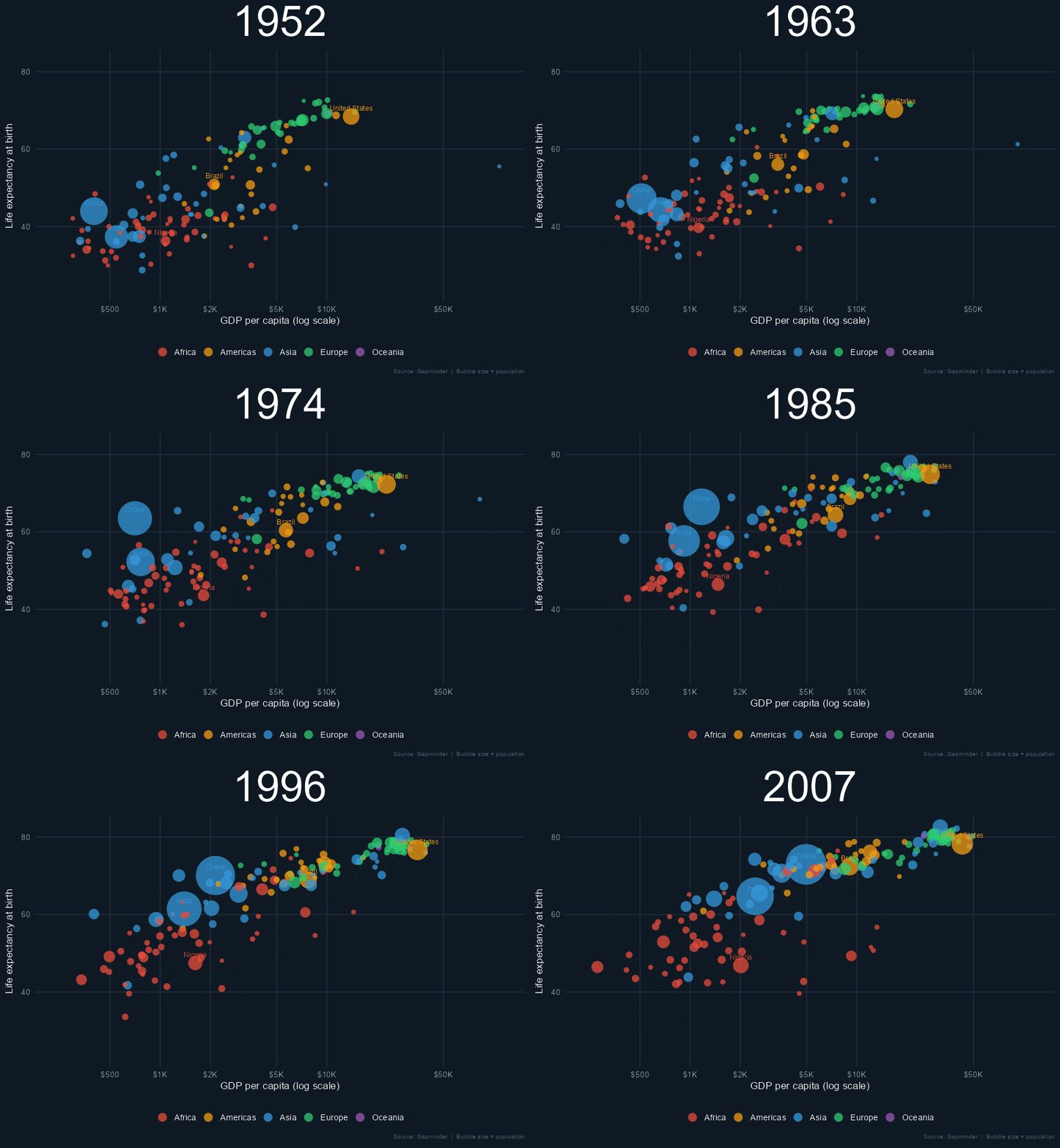
## What the chart shows
- **Africa** (red) clusters bottom-left in 1952 — low income, low life expectancy — and moves right and up over 55 years, but more slowly than other continents.
- **Asia** (blue) shows the most dramatic movement. South Korea, Singapore, and China all make huge leaps.
- **Europe** (green) starts already in the upper-right and pushes further right.
- The **gap** between rich and poor narrows dramatically — the world Rosling called "two humps" in 1952 becomes one.
---
## Customising it
### Change which countries get labels
```{r custom_labels, eval=FALSE}
big_countries <- c("China", "India", "United States", "Germany", "Japan")
```
### Change the speed
```{r custom_speed, eval=FALSE}
animate(p, nframes = 60, fps = 6, ...)   # slower
animate(p, nframes = 240, fps = 24, ...) # smoother
```
### Filter to one continent
```{r custom_continent, eval=FALSE}
gapminder_asia <- gapminder[gapminder$continent == "Asia", ]
# then replace gapminder with gapminder_asia in the ggplot() call
```
### Save as MP4 instead of GIF
```{r custom_mp4, eval=FALSE}
# install.packages("av")
animate(p, renderer = av_renderer("gapminder.mp4"), fps = 24, width = 1280, height = 720)
```
---
## Further reading
- [Gapminder Foundation](https://www.gapminder.org/) — Hans Rosling's original project and data
- [gganimate documentation](https://gganimate.com/) — all transition types and rendering options
- [ggplot2 book](https://ggplot2-book.org/) — the definitive reference for ggplot2
---
*Rendered with R `r getRversion()` · ggplot2 · gganimate · gapminder*