---
title: "EU Salary Race: Average Full-Time Adjusted Wages"
author: ""
output:
html_document:
css: styles.css
theme: flatly
highlight: tango
toc: true
toc_float: true
code_folding: show
self_contained: true
vignette: >
%\VignetteIndexEntry{EU Salary Race}
%\VignetteEngine{knitr::rmarkdown}
%\VignetteEncoding{UTF-8}
---
```{r setup, include=FALSE}
directory<-if (rstudioapi::isAvailable()) paste0(dirname(rstudioapi::getActiveDocumentContext()$path),"/") else ""
source(paste0(directory, "R/code_options.R"))
source(paste0(directory, "R/code_rwf.R"))
```
## What is this?
Eurostat publishes yearly **average full-time adjusted salaries** (`nama_10_fte`) for every EU/EFTA country. This vignette pulls that series directly from the Eurostat API and turns it into three progressively more polished visualisations: an interactive time series, an animated bar chart, and a "bar chart race" — with Greece highlighted in red against the rest of Europe in gray.
---
## Packages
```{r packages}
# install.packages(c("dplyr", "tidyr", "countrycode", "plotly",
#                     "eurostat", "gganimate", "gifski", "scales", "ragg"))

library(dplyr)
library(tidyr)
library(countrycode)  # geo codes -> country names / ISO codes
library(plotly)       # interactive charts
library(eurostat)     # Eurostat data API
library(gganimate)    # animation
library(gifski)       # GIF renderer
library(scales)       # axis formatting
```
---
## The data
`get_eurostat()` downloads the raw dataset table by its Eurostat code. We keep only country-level rows (dropping the `EU27_2020` and `EA20` aggregates), derive a plain-language country name and ISO code with `countrycode`, and rank countries by salary within each year.
```{r data}
df_eusalary <- get_eurostat("nama_10_fte", filters = list(unit = "EUR"))
df_eusalary <- df_eusalary[!df_eusalary$geo %in% c("EU27_2020", "EA20"), ]

df_eusalary$year    <- lubridate::year(df_eusalary$time)
df_eusalary$country <- countrycode(df_eusalary$geo, origin = "eurostat", destination = "country.name")
df_eusalary$iso     <- countrycode(df_eusalary$geo, origin = "eurostat", destination = "iso2c")

df_eusalary$rank  <- NA
df_eusalary$color <- NA
for (i in unique(df_eusalary$year)) {
  df_eusalary[df_eusalary$year %in% i, "rank"] <-
    rank(-df_eusalary[df_eusalary$year %in% i, "values"], ties.method = "min")
}

df_eusalary[df_eusalary$country %in% "Greece", "color"]  <- "#E74C3C"
df_eusalary[!df_eusalary$country %in% "Greece", "color"] <- "gray70"

title <- "Average full time adjusted salary [nama_10_fte]"

head(df_eusalary[, c("country", "year", "values", "rank")], 12)
```
Each row is one country in one year, with:
| Column | Description |
|--------|-------------|
| `country` | Country name (derived from Eurostat's `geo` code) |
| `year` | Year of observation |
| `values` | Average full-time adjusted salary, in EUR |
| `rank` | Country's salary rank within that year (1 = highest) |
| `color` | Highlight color — red for Greece, gray for everyone else |
---
## Building the visualisations
### Step 1 — interactive time series
A line per country lets you trace how each economy moved over time, and hovering reveals the exact value.
```{r timeseries}
colors <- c("#e6194b", "#3cb44b", "#ffe119", "#0082c8", "#f58231", "#911eb4", "#46f0f0",
            "#f032e6", "#d2f53c", "#fabebe", "#008080", "#e6beff", "#aa6e28", "#fffac8",
            "#800000", "#aaffc3", "#808000", "#ffd8b1", "#000080", "#808080", "#ffffff",
            "#000000")

plot_ly(df_eusalary[df_eusalary$values > 0, ],
        x = ~year,
        y = ~values,
        color = ~country,
        mode = "lines+markers",
        type = "scatter",
        text = ~paste("Year:", year,
                      "<br>Value:", values,
                      "<br>Country Name:", country),
        hoverinfo = "text",
        colors = colors,
        showlegend = TRUE,
        marker = list(size = 8)) %>%
  plotly::layout(title = "",
                 autosize = TRUE,
                 margin = list(l = 50, r = 50, b = 50, t = 50, pad = 0),
                 legend = list(orientation = "vertical", xanchor = "right", x = 30, y = 1),
                 xaxis = list(title = "Year", tickangle = -90),
                 yaxis = list(title = ""),
                 font = list(size = 20, color = "gray25", weight = "bold"))
```
### Step 2 — animated bar chart
Sliding a `frame` argument to `plot_ly` turns a static bar chart into a play/pause animation stepping through each year.
```{r animated_bar}
plot_ly(df_eusalary,
        x = ~country,
        y = ~values,
        frame = ~year,
        ids = ~country,
        type = "bar",
        text = ~paste("Year:", year,
                      "<br>Value:", values,
                      "<br>Country:", country),
        hoverinfo = "text",
        colors = colors,
        showlegend = FALSE) %>%
  layout(
    title  = title,
    xaxis  = list(title = "", tickangle = -90),
    yaxis  = list(title = "Euro"),
    font   = list(size = 20, color = "gray25", weight = "bold"),
    margin = list(l = 50, r = 50, b = 200, t = 100)
  ) %>%
  animation_opts(
    frame = 500,
    transition = 500,
    easing = "linear",
    redraw = FALSE,
    mode = "immediate"
  )
```
### Step 3 — bar chart race, ranked
Instead of plotting by country name, we plot by `rank`, so the bars physically reorder every year as economies overtake each other. Greece is layered on top in red so it's always visible against the gray field.
```{r bar_race}
plot_ly() %>%
  add_bars(
    data         = df_eusalary[df_eusalary$color == "gray70", ],
    x            = ~rank,
    y            = ~values,
    frame        = ~year,
    ids          = ~rank,
    marker       = list(color = "gray70"),
    text         = ~country,
    hoverinfo    = "text",
    textposition = "outside",
    textangle    = 90,
    showlegend   = FALSE
  ) %>%
  add_bars(
    data         = df_eusalary[df_eusalary$color %in% "#E74C3C", ],
    x            = ~rank,
    y            = ~values,
    frame        = ~year,
    ids          = ~rank,
    marker       = list(color = "#E74C3C"),
    text         = ~country,
    hoverinfo    = "text",
    textposition = "outside",
    textangle    = 90,
    showlegend   = FALSE
  ) %>%
  layout(
    xaxis  = list(title = "Rank", tickmode = "array"),
    yaxis  = list(title = "Euro"),
    title  = title,
    margin = list(l = 50, r = 50, b = 200, t = 100),
    font   = list(size = 20, color = "gray25", weight = "bold")
  ) %>%
  animation_opts(frame = 1000, transition = 0, easing = "linear", redraw = TRUE)
```
### Step 4 — dark themed GIF with `gganimate`
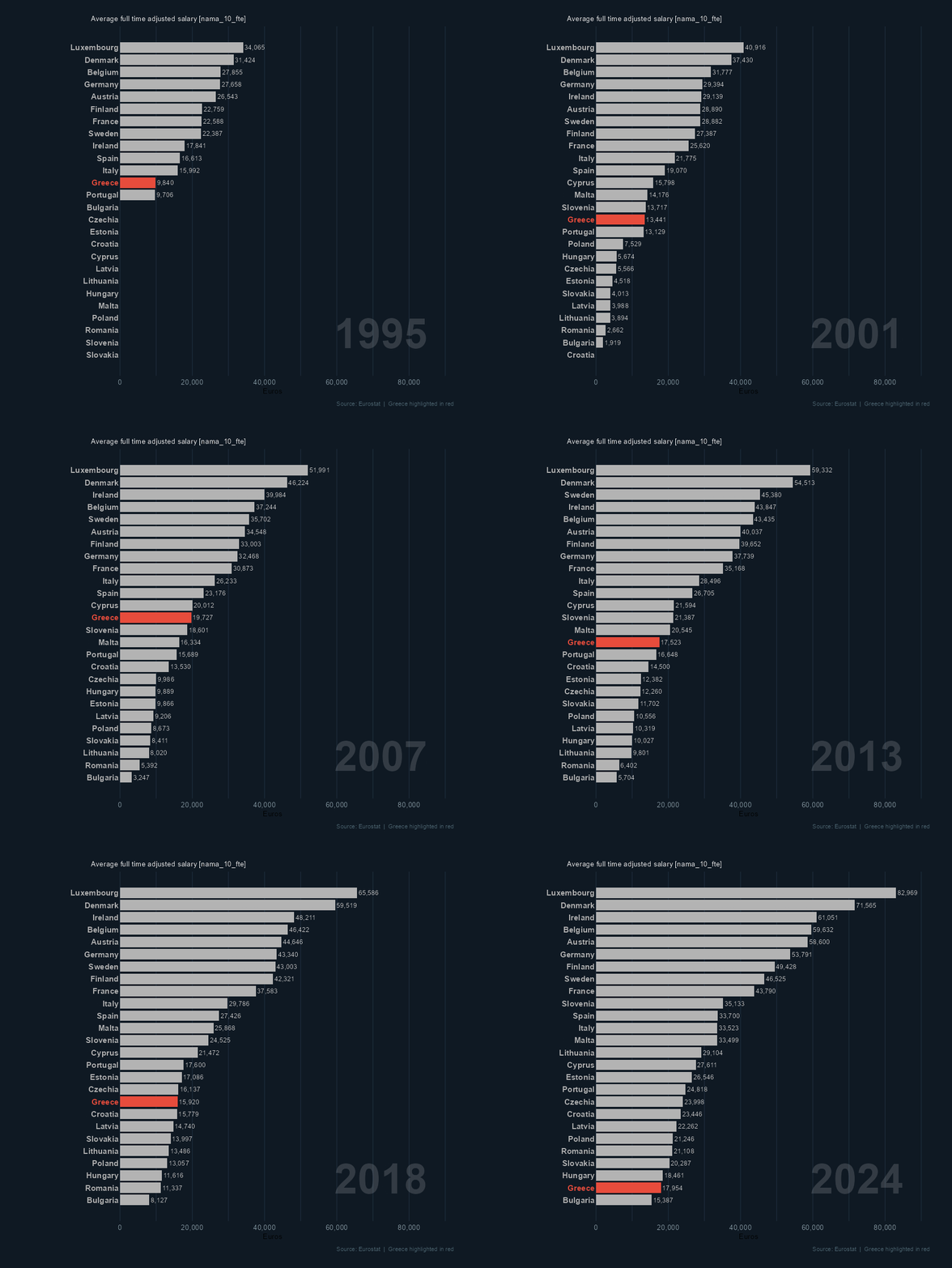
The interactive versions above are great for exploring in a browser, but a rendered GIF is easier to share. `ggplot2` + `gganimate` recreates the same ranked race as a horizontal bar chart with a dark background, country labels, and a large year watermark.
```{r gif, eval=TRUE}
p <- ggplot(df_eusalary, aes(x = rank, y = values, fill = color, group = country)) +
  geom_col(width = 0.85, show.legend = FALSE) +
  geom_text(aes(y = 0, label = country, color = color),
            hjust = 1, nudge_y = -400,
            size = 3.8, fontface = "bold", show.legend = FALSE) +
  geom_text(aes(label = comma(values, accuracy = 1)),
            hjust = 0, nudge_y = 400,
            color = "gray80", size = 3.2) +
  scale_fill_identity() +
  scale_color_identity() +
  scale_x_reverse(breaks = NULL) +
  scale_y_continuous(
    labels = comma,
    breaks = seq(0, 100000, by = 20000),
    limits = c(-8000, NA),
    expand = expansion(mult = c(0, 0.08))
  ) +
  geom_text(
    data = df_eusalary %>% dplyr::distinct(year),
    aes(x = 23, y = 85000, label = year),
    inherit.aes = FALSE,
    hjust = 1, vjust = 1,
    size = 20, color = "white", alpha = 0.15,
    fontface = "bold"
  ) +
  coord_flip(clip = "off") +
  labs(title   = title,
       x       = NULL,
       y       = "Euros",
       caption = "Source: Eurostat  |  Greece highlighted in red") +
  theme_minimal(base_size = 10) +
  theme(
    plot.background    = element_rect(fill = "#0F1923", color = NA),
    panel.background   = element_rect(fill = "#0F1923", color = NA),
    panel.grid.major.x = element_line(color = "#1E2D3D", linewidth = 0.4),
    panel.grid.major.y = element_blank(),
    panel.grid.minor   = element_blank(),
    panel.grid.minor.x = element_line(color = "#1E2D3D", linewidth = 0.4),
    axis.text.x   = element_text(color = "#90A4AE", size = 10),
    axis.text.y   = element_blank(),
    plot.title    = element_text(color = "white", face = "bold", size = 10,
                                  margin = margin(12, 0, 2, 0)),
    plot.subtitle = element_text(color = "gray80", face = "bold", size = 10,
                                  hjust = 0.98,
                                  margin = margin(0, 0, 6, 0)),
    plot.caption  = element_text(color = "#546E7A", size = 8, hjust = 1,
                                  margin = margin(8, 0, 8, 0)),
    plot.margin   = margin(10, 30, 10, 120)) +
  transition_states(year, transition_length = 0, state_length = 5) +
  ease_aes("cubic-in-out")

animate(p,
        nframes  = 100,
        fps      = 10,
        duration = 20,
        width    = 900,
        height   = 800,
        units    = "px",
        res      = 100,   # set explicitly: when knitting, gganimate otherwise uses the chunk dpi (300 x retina 2)
        renderer = gifski_renderer(paste0(directory,"eu_salary_race.gif")))
```
> **Note:** rendering the GIF takes a couple of minutes and requires an internet connection to reach the Eurostat API. The GIF is written to the working directory (`getwd()`).
```{r show_gif, echo=TRUE}
# knitr::include_graphics(paste0(directory,"eu_salary_race.gif"))
```
---
## What the chart shows
- Northern and Western European economies (e.g. Denmark, Luxembourg, Ireland) consistently occupy the top ranks across the whole period.
- Greece sits in the lower half of the ranking throughout, and its relative position (highlighted in red) makes the post-2010 economic crisis visible as a plateau while other countries continue climbing.
- Ranks shuffle more among mid-table countries than at the extremes — the top and bottom of the distribution are comparatively stable year to year.
---
## Customising it
### Highlight a different country
```{r custom_highlight, eval=FALSE}
df_eusalary[df_eusalary$country %in% "Portugal", "color"]  <- "#E74C3C"
df_eusalary[!df_eusalary$country %in% "Portugal", "color"] <- "gray70"
```
### Change the animation speed
```{r custom_speed, eval=FALSE}
animate(p, nframes = 50, fps = 5, duration = 10, ...)   # faster / shorter
animate(p, nframes = 200, fps = 20, duration = 30, ...) # smoother / longer
```
### Save as MP4 instead of GIF
```{r custom_mp4, eval=FALSE}
# install.packages("av")
animate(p, renderer = av_renderer("eu_salary_race.mp4"), fps = 24, width = 1280, height = 720)
```
---
## Further reading
- [Eurostat `nama_10_fte` dataset](https://ec.europa.eu/eurostat/databrowser/view/nama_10_fte/default/table) — average full-time adjusted salary series
- [`eurostat` R package](https://ropengov.github.io/eurostat/) — programmatic access to Eurostat data
- [gganimate documentation](https://gganimate.com/) — all transition types and rendering options
---
*Rendered with R `r getRversion()` · plotly · ggplot2 · gganimate · eurostat*