Code
# The chart layout below hard-codes 25 columns x 27 rows = 675 slots for 657 colors.
# This assumes the palette size hasn't changed between R versions.
length(colors())[1] 657
efg, Stowers Institute for Medical Research (original script); annotated version
R ships with a built-in palette of named colors, returned by colors(). As of this writing (and for a long time now) it holds 657 names — things like "steelblue", "tomato3", or "gray42". This document walks through a classic script by efg (Stowers Institute) that turns that list into a printable reference chart, and along the way explains the underlying R color machinery: how names map to RGB, how RGB maps to HSV, and how to pick readable text/background combinations automatically.
The original script writes everything to a file called COLOR_CHART.pdf. Here we reproduce each piece as an inline, explained chunk so it renders directly in this document; the full original (PDF-producing) script is included as an appendix at the end for reference.
R gives you three interchangeable ways to specify a color:
colors(), e.g. "firebrick"."#FF0000", the familiar web-style RRGGBB (optionally with alpha, RRGGBBAA).palette()), rarely used now.col2rgb() converts any of the first two into the underlying 0–255 RGB triplet:
[,1]
red 255
green 255
blue 0
[,1]
red 70
green 130
blue 180
RGB is how the color is stored, but it is not how humans reason about color. For that, R (via rgb2hsv()) can convert to HSV — Hue, Saturation, Value — which separates what color (hue, as an angle 0–1 representing 0–360°) from how vivid (saturation) and how bright (value):
Sorting colors by hue-then-saturation-then-value is what makes the second chart below (“sorted by hue”) group visually similar colors together, instead of the arbitrary alphabetical-ish order colors() returns them in.
Rectangles need a label (the color’s name and index) drawn on top of them. White text on "yellow" is unreadable; black text on "navy" is unreadable. The script uses a cheap luminance heuristic: average the R, G, and B channels, and if that average is above the midpoint (127.5), the background is “light” so use black text; otherwise use white text.
[1] "black"
[1] "white"
[1] "white"
[1] "black"
This is a simplification — perceptual luminance weights green much more heavily than blue (roughly 0.299*R + 0.587*G + 0.114*B), so a plain channel average can misjudge some saturated blues or reds. It’s good enough for a quick reference chart, though, which is the point here.
We precompute the contrast color for every entry in colors() once, so the plotting loops below can just look it up instead of recomputing it per rectangle:
The simplest chart just walks colors() in the order R returns it, laying out 25 colors per row. Each rectangle is drawn with rect(), positioned by its row/column, filled with the color itself, and labeled with its numeric index (SetTextContrastColor decides whether that label is black or white).
colCount <- 25 # number of rectangles per row
rowCount <- ceiling(length(colors()) / colCount)
oldpar <- par(mar = c(1, 1, 2, 1))
plot(c(1, colCount), c(0, rowCount), type = "n", ylab = "", xlab = "",
axes = FALSE, ylim = c(rowCount, 0))
title("R colors (index order)")
for (j in 0:(rowCount - 1)) {
base <- j * colCount
remaining <- length(colors()) - base
RowSize <- ifelse(remaining < colCount, remaining, colCount)
rect((1:RowSize) - 0.5, j - 0.5, (1:RowSize) + 0.5, j + 0.5,
border = "black", col = colors()[base + (1:RowSize)])
text((1:RowSize), j, paste(base + (1:RowSize)), cex = 0.7,
col = TextContrastColor[base + (1:RowSize)])
}
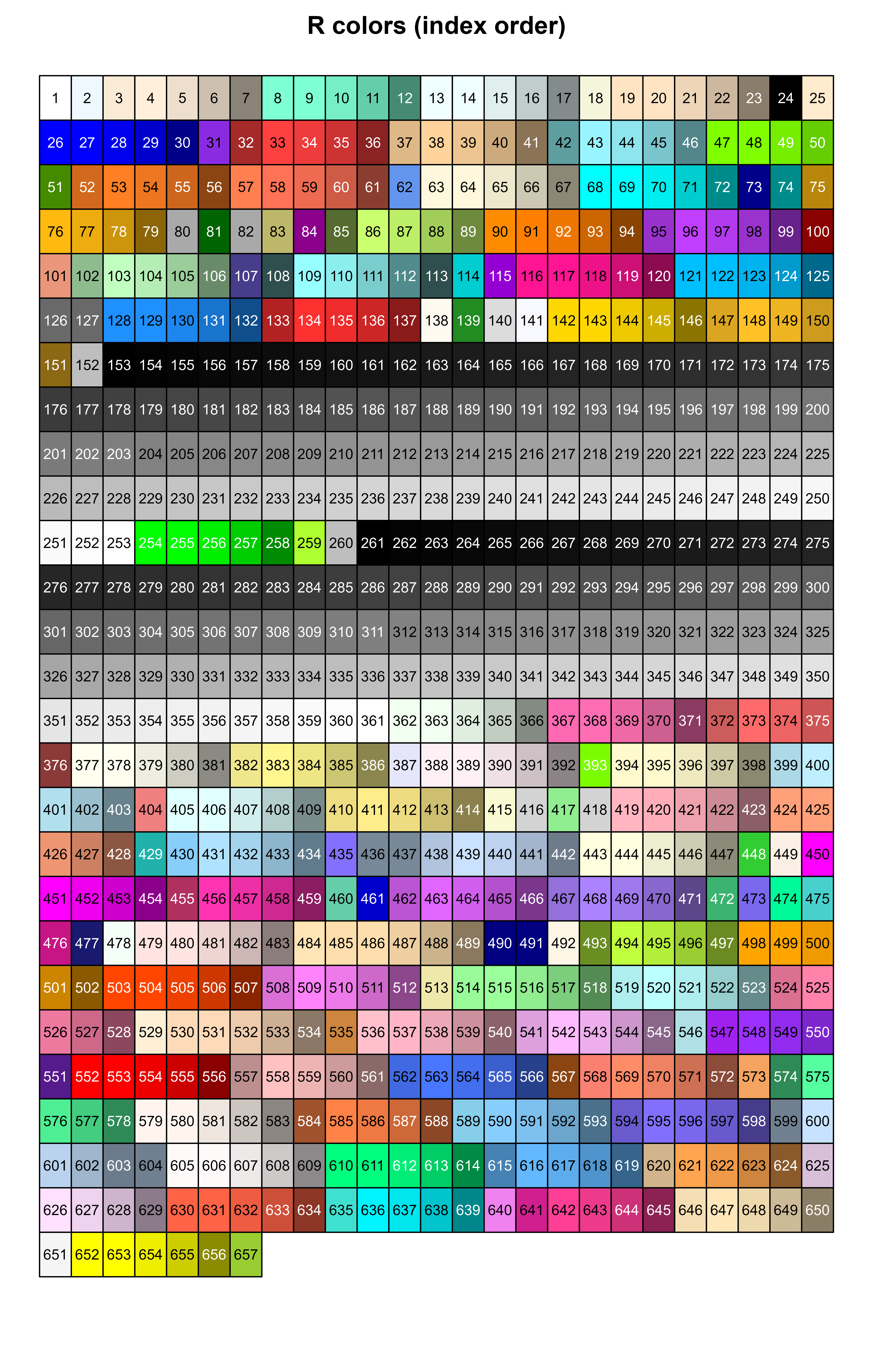
Notice how little visual structure there is: R’s colors() order is alphabetical by name (with numbered variants like "blue1".."blue4" interleaved), not by appearance, so neighboring cells jump around the color wheel.
To get a chart that actually reads as a gradient, we convert every color to HSV and sort by hue first, then saturation, then value. order() gives us the permutation of indices that achieves that sort, and we index into colors() with it.
RGBColors <- col2rgb(colors())
HSVColors <- rgb2hsv(RGBColors[1, ], RGBColors[2, ], RGBColors[3, ], maxColorValue = 255)
HueOrder <- order(HSVColors[1, ], HSVColors[2, ], HSVColors[3, ])
oldpar <- par(mar = c(1, 1, 2, 1))
plot(0, type = "n", ylab = "", xlab = "", axes = FALSE,
ylim = c(rowCount, 0), xlim = c(1, colCount))
title("R colors -- sorted by hue, saturation, value")
for (j in 0:(rowCount - 1)) {
for (i in 1:colCount) {
k <- j * colCount + i
if (k <= length(colors())) {
rect(i - 0.5, j - 0.5, i + 0.5, j + 0.5,
border = "black", col = colors()[HueOrder[k]])
text(i, j, paste(HueOrder[k]), cex = 0.7,
col = TextContrastColor[HueOrder[k]])
}
}
}
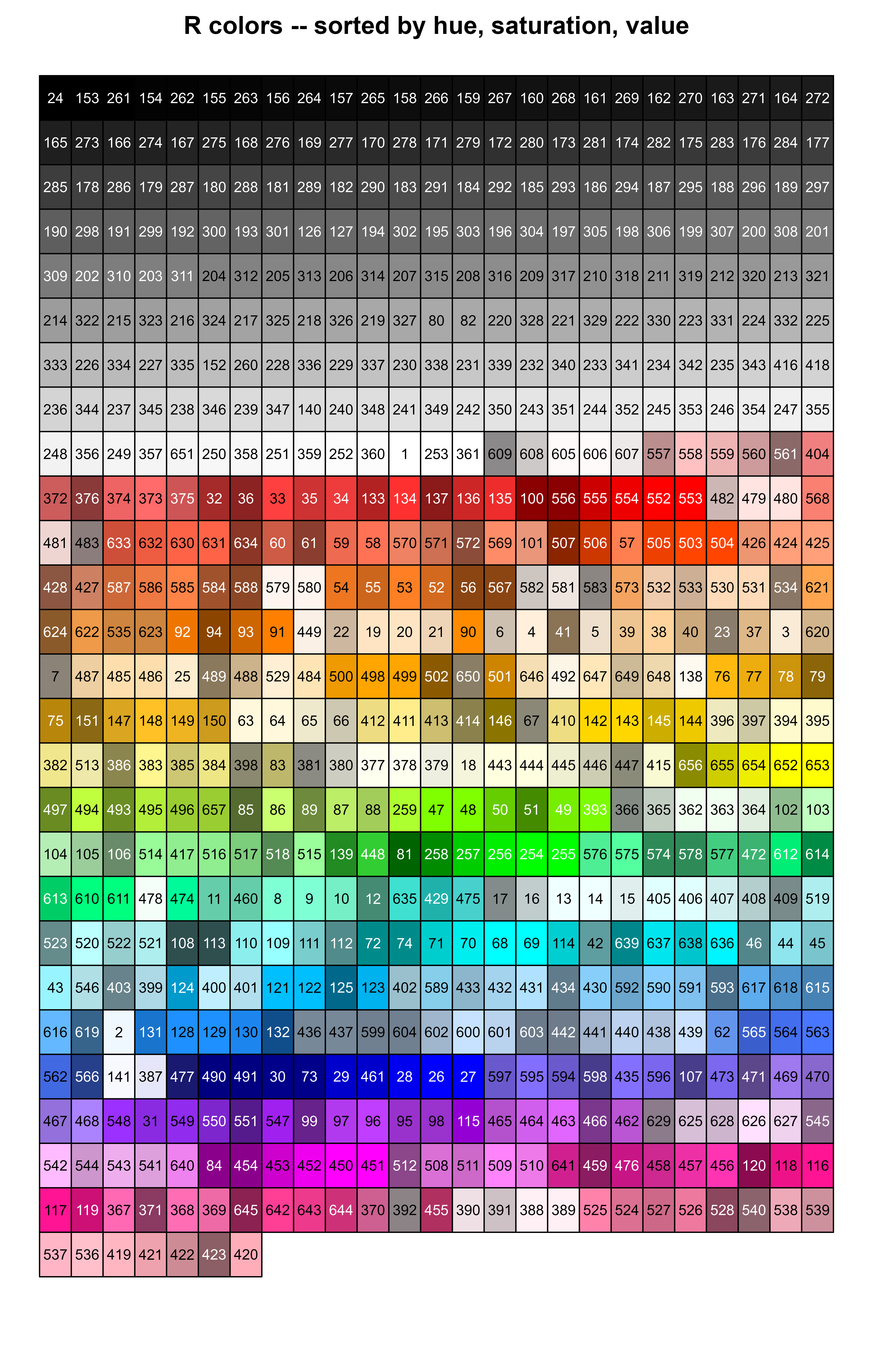
The label in each cell is still the original index into colors() — so you can look up a color visually here, then use that number (or better, colors()[index]) to reference it by name in code.
For a reference sheet you usually want the exact hex code (for CSS/HTML/design tools) alongside the decimal RGB triplet (for R/plotting code). sprintf() builds both from col2rgb()’s output in one line:
The final part of the original script produces a multi-page listing: two columns of 50 colors each per page, each row showing a filled swatch, the color’s index, its name, and its hex/decimal RGB (in a monospace font so the numbers align). Below is a single representative page reproduced inline; the appendix has the full paging loop that generates every page (this is what the original script writes across the multi-page PDF).
index <- paste(1:length(colors()))
HexAndDec <- unlist(lapply(colors(), GetColorHexAndDecimal))
PerColumn <- 50
PerPage <- 2 * PerColumn
page <- 1
oldpar <- par(mar = c(1, 1, 1, 1))
plot(0, type = "n", ylab = "", xlab = "", axes = FALSE,
ylim = c(PerColumn, 0), xlim = c(0, 1))
title("R colors")
mtext(paste("page", page), side = 1, adj = 1, line = -1)
base <- PerPage * (page - 1)
# Column 1
remaining <- length(colors()) - base
ColumnSize <- ifelse(remaining < PerColumn, remaining, PerColumn)
rect(0.00, 0:(ColumnSize - 1), 0.49, 1:ColumnSize,
border = "black", col = colors()[(base + 1):(base + ColumnSize)])
text(0.045, 0.45 + (0:(ColumnSize - 1)), adj = 1, index[(base + 1):(base + ColumnSize)],
cex = 0.6, col = TextContrastColor[(base + 1):(base + ColumnSize)])
text(0.06, 0.45 + (0:(ColumnSize - 1)), adj = 0, colors()[(base + 1):(base + ColumnSize)],
cex = 0.6, col = TextContrastColor[(base + 1):(base + ColumnSize)])
save <- par(family = "mono")
text(0.25, 0.45 + (0:(ColumnSize - 1)), adj = 0, HexAndDec[(base + 1):(base + ColumnSize)],
cex = 0.6, col = TextContrastColor[(base + 1):(base + ColumnSize)])
par(save)
# Column 2
if (remaining > PerColumn) {
remaining2 <- remaining - PerColumn
ColumnSize2 <- ifelse(remaining2 < PerColumn, remaining2, PerColumn)
rect(0.51, 0:(ColumnSize2 - 1), 1.00, 1:ColumnSize2,
border = "black", col = colors()[(base + PerColumn + 1):(base + PerColumn + ColumnSize2)])
text(0.545, 0.45 + (0:(ColumnSize2 - 1)), adj = 1,
index[(base + PerColumn + 1):(base + PerColumn + ColumnSize2)],
cex = 0.6, col = TextContrastColor[(base + PerColumn + 1):(base + PerColumn + ColumnSize2)])
text(0.56, 0.45 + (0:(ColumnSize2 - 1)), adj = 0,
colors()[(base + PerColumn + 1):(base + PerColumn + ColumnSize2)],
cex = 0.6, col = TextContrastColor[(base + PerColumn + 1):(base + PerColumn + ColumnSize2)])
save <- par(family = "mono")
text(0.75, 0.45 + (0:(ColumnSize2 - 1)), adj = 0,
HexAndDec[(base + PerColumn + 1):(base + PerColumn + ColumnSize2)],
cex = 0.6, col = TextContrastColor[(base + PerColumn + 1):(base + PerColumn + ColumnSize2)])
par(save)
}
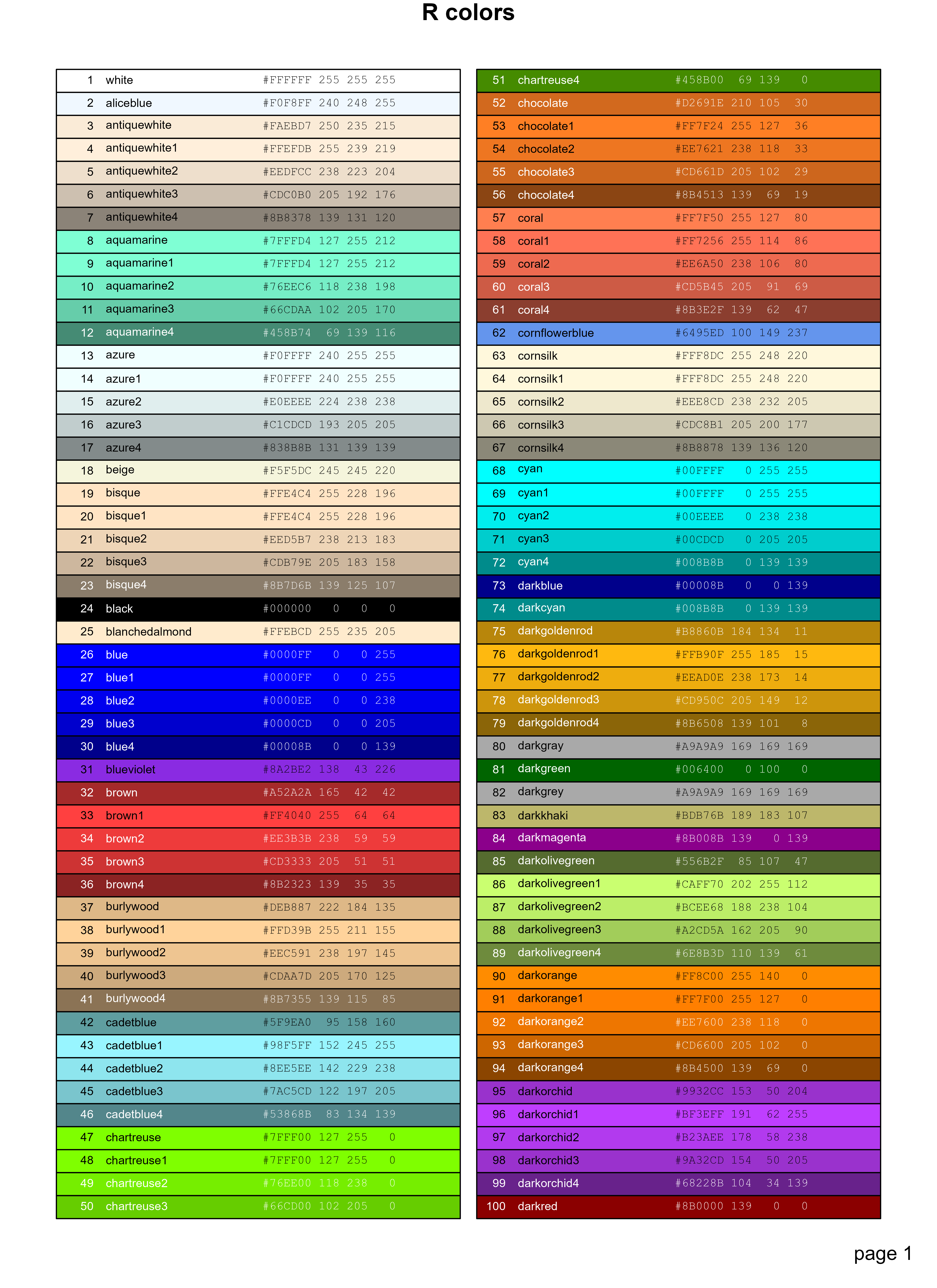
To generate every page (not just page 1) and get the full multi-page reference sheet, wrap that same block in a loop over page in 1:ceiling(length(colors()) / PerPage) and, when knitting, either emit one PDF page per iteration or (for HTML) let each iteration produce its own plot — see the appendix for the loop as written in the original script.
colors() is R’s built-in named palette (657 entries); col2rgb() and rgb2hsv() convert between name/hex, RGB, and HSV representations.sprintf("#%02X%02X%02X ...") is the idiomatic way to format an RGB triplet as both hex and decimal in one string.COLOR_CHART.pdf)# efg, Stowers Institute for Medical Research
# efg's Research Notes: http://research.stowers-institute.org/efg/R/Color/Chart 6 July 2004. Modified 23 May 2005.
pdf("COLOR_CHART.pdf", width = 10, height = 10)
# save to reset at end
oldparameters <- par(mar = c(1, 1, 2, 1), mfrow = c(2, 1))
# Be cautious in case definition of "colors" changes. Use some hard-coded constants since this is not expected to change.
stopifnot(length(colors()) == 657)
# 0. Setup
SetTextContrastColor <- function(color) {ifelse(mean(col2rgb(color)) > 127, "black", "white")}
TextContrastColor <- unlist(lapply(colors(), SetTextContrastColor))
# 1a. Plot matrix of R colors, in index order, 25 per row.
colCount <- 25
rowCount <- 27
plot(c(1, colCount), c(0, rowCount), type = "n", ylab = "", xlab = "", axes = FALSE, ylim = c(rowCount, 0))
title("R colors")
mtext("http://research.stowers-institute.org/efg/R/Color/Chart", cex = 0.6)
for (j in 0:(rowCount - 1)) {
base <- j * colCount
remaining <- length(colors()) - base
RowSize <- ifelse(remaining < colCount, remaining, colCount)
rect((1:RowSize) - 0.5, j - 0.5, (1:RowSize) + 0.5, j + 0.5, border = "black", col = colors()[base + (1:RowSize)])
text((1:RowSize), j, paste(base + (1:RowSize)), cex = 0.7, col = TextContrastColor[base + (1:RowSize)])
}
# 1b. Plot matrix of R colors, in "hue" order, 25 per row.
RGBColors <- col2rgb(colors()[1:length(colors())])
HSVColors <- rgb2hsv(RGBColors[1, ], RGBColors[2, ], RGBColors[3, ], maxColorValue = 255)
HueOrder <- order(HSVColors[1, ], HSVColors[2, ], HSVColors[3, ])
plot(0, type = "n", ylab = "", xlab = "", axes = FALSE, ylim = c(rowCount, 0), xlim = c(1, colCount))
title("R colors -- Sorted by Hue, Saturation, Value")
for (j in 0:(rowCount - 1)) {
for (i in 1:colCount) {
k <- j * colCount + i
if (k <= length(colors())) {
rect(i - 0.5, j - 0.5, i + 0.5, j + 0.5, border = "black", col = colors()[HueOrder[k]])
text(i, j, paste(HueOrder[k]), cex = 0.7, col = TextContrastColor[HueOrder[k]])
}
}
}
# 2. Create 7-page color chart showing rectangle block of color, along with index, color name, and RGB constants in hex and decimal.
GetColorHexAndDecimal <- function(color) {
c <- col2rgb(color)
sprintf("#%02X%02X%02X %3d %3d %3d", c[1], c[2], c[3], c[1], c[2], c[3])
}
par(oldparameters)
oldparameters <- par(mar = c(1, 1, 1, 1))
index <- paste(1:length(colors()))
HexAndDec <- unlist(lapply(colors(), GetColorHexAndDecimal))
PerColumn <- 50
PerPage <- 2 * PerColumn
for (page in 1:(trunc(length(colors()) + (PerPage - 1)) / PerPage)) {
plot(0, type = "n", ylab = "", xlab = "", axes = FALSE, ylim = c(PerColumn, 0), xlim = c(0, 1))
title("R colors")
mtext(paste("page ", page), SOUTH <- 1, adj = 1, line = -1)
base <- PerPage * (page - 1)
# Column 1
remaining <- length(colors()) - base
ColumnSize <- ifelse(remaining < PerColumn, remaining, PerColumn)
rect(0.00, 0:(ColumnSize - 1), 0.49, 1:ColumnSize, border = "black", col = colors()[(base + 1):(base + ColumnSize)])
text(0.045, 0.45 + (0:(ColumnSize - 1)), adj = 1, index[(base + 1):(base + ColumnSize)], cex = 0.6, col = TextContrastColor[(base + 1):(base + ColumnSize)])
text(0.06, 0.45 + (0:(ColumnSize - 1)), adj = 0, colors()[(base + 1):(base + ColumnSize)], cex = 0.6, col = TextContrastColor[(base + 1):(base + ColumnSize)])
save <- par(family = "mono")
text(0.25, 0.45 + (0:(ColumnSize - 1)), adj = 0, HexAndDec[(base + 1):(base + ColumnSize)], cex = 0.6, col = TextContrastColor[(base + 1):(base + ColumnSize)])
par(save)
# Column 2
if (remaining > PerColumn) {
remaining <- remaining - PerColumn
ColumnSize <- ifelse(remaining < PerColumn, remaining, PerColumn)
rect(0.51, 0:(ColumnSize - 1), 1.00, 1:ColumnSize, border = "black", col = colors()[(base + PerColumn + 1):(base + PerColumn + ColumnSize)])
text(0.545, 0.45 + (0:(ColumnSize - 1)), adj = 1, index[(base + PerColumn + 1):(base + PerColumn + ColumnSize)], cex = 0.6, col = TextContrastColor[(base + PerColumn + 1):(base + PerColumn + ColumnSize)])
text(0.56, 0.45 + (0:(ColumnSize - 1)), adj = 0, colors()[(base + PerColumn + 1):(base + PerColumn + ColumnSize)], cex = 0.6, col = TextContrastColor[(base + PerColumn + 1):(base + PerColumn + ColumnSize)])
save <- par(family = "mono")
text(0.75, 0.45 + (0:(ColumnSize - 1)), adj = 0, HexAndDec[(base + PerColumn + 1):(base + PerColumn + ColumnSize)], cex = 0.6, col = TextContrastColor[(base + PerColumn + 1):(base + PerColumn + ColumnSize)])
par(save)
}
}
par(oldparameters)
dev.off()---
title: "R Colors: Names, RGB/HSV, and Building a Color Chart"
author: "efg, Stowers Institute for Medical Research (original script); annotated version"
output:
html_document:
css: styles.css
theme: flatly
highlight: tango
toc: true
toc_float: true
code_folding: show
self_contained: true
---
```{r setup, include=FALSE}
directory<-if (rstudioapi::isAvailable()) paste0(dirname(rstudioapi::getActiveDocumentContext()$path),"/") else ""
source(paste0(directory, "R/code_options.R"))
source(paste0(directory, "R/code_rwf.R"))
```
# Background
R ships with a built-in palette of named colors, returned by `colors()`. As of this
writing (and for a long time now) it holds **657** names — things like `"steelblue"`,
`"tomato3"`, or `"gray42"`. This document walks through a classic script by efg
(Stowers Institute) that turns that list into a printable reference chart, and along
the way explains the underlying R color machinery: how names map to RGB, how RGB maps
to HSV, and how to pick readable text/background combinations automatically.
The original script writes everything to a file called `COLOR_CHART.pdf`. Here we
reproduce each piece as an inline, explained chunk so it renders directly in this
document; the full original (PDF-producing) script is included as an appendix at the
end for reference.
```{r sanity-check}
# The chart layout below hard-codes 25 columns x 27 rows = 675 slots for 657 colors.
# This assumes the palette size hasn't changed between R versions.
length(colors())
```
# How R represents colors
R gives you three interchangeable ways to specify a color:
1. **By name** — a string from `colors()`, e.g. `"firebrick"`.
2. **By hex code** — `"#FF0000"`, the familiar web-style RRGGBB (optionally with alpha, RRGGBBAA).
3. **By numeric index** — a legacy palette (`palette()`), rarely used now.
`col2rgb()` converts any of the first two into the underlying 0–255 RGB triplet:
```{r col2rgb-demo}
col2rgb("yellow")
col2rgb("steelblue")
```
RGB is how the color is stored, but it is not how humans reason about color. For
that, R (via `rgb2hsv()`) can convert to **HSV** — Hue, Saturation, Value — which
separates *what color* (hue, as an angle 0–1 representing 0–360°) from *how vivid*
(saturation) and *how bright* (value):
```{r rgb2hsv-demo}
rgb2hsv(col2rgb("steelblue"))
```
Sorting colors by hue-then-saturation-then-value is what makes the second chart
below ("sorted by hue") group visually similar colors together, instead of the
arbitrary alphabetical-ish order `colors()` returns them in.
# Choosing readable text color: a contrast heuristic
Rectangles need a label (the color's name and index) drawn *on top of* them. White
text on `"yellow"` is unreadable; black text on `"navy"` is unreadable. The script
uses a cheap luminance heuristic: average the R, G, and B channels, and if that
average is above the midpoint (127.5), the background is "light" so use black text;
otherwise use white text.
```{r contrast-function}
SetTextContrastColor <- function(color) {
ifelse(mean(col2rgb(color)) > 127, "black", "white")
}
SetTextContrastColor("white")
SetTextContrastColor("black")
SetTextContrastColor("red")
SetTextContrastColor("yellow")
```
This is a simplification — perceptual luminance weights green much more heavily
than blue (roughly `0.299*R + 0.587*G + 0.114*B`), so a plain channel average can
misjudge some saturated blues or reds. It's good enough for a quick reference
chart, though, which is the point here.
We precompute the contrast color for every entry in `colors()` once, so the
plotting loops below can just look it up instead of recomputing it per rectangle:
```{r contrast-vector}
TextContrastColor <- unlist(lapply(colors(), SetTextContrastColor))
table(TextContrastColor)
```
# Chart 1a: colors in index order
The simplest chart just walks `colors()` in the order R returns it, laying out
25 colors per row. Each rectangle is drawn with `rect()`, positioned by its
row/column, filled with the color itself, and labeled with its numeric index
(`SetTextContrastColor` decides whether that label is black or white).
```{r chart-index-order, fig.height=11}
colCount <- 25 # number of rectangles per row
rowCount <- ceiling(length(colors()) / colCount)
oldpar <- par(mar = c(1, 1, 2, 1))
plot(c(1, colCount), c(0, rowCount), type = "n", ylab = "", xlab = "",
axes = FALSE, ylim = c(rowCount, 0))
title("R colors (index order)")
for (j in 0:(rowCount - 1)) {
base <- j * colCount
remaining <- length(colors()) - base
RowSize <- ifelse(remaining < colCount, remaining, colCount)
rect((1:RowSize) - 0.5, j - 0.5, (1:RowSize) + 0.5, j + 0.5,
border = "black", col = colors()[base + (1:RowSize)])
text((1:RowSize), j, paste(base + (1:RowSize)), cex = 0.7,
col = TextContrastColor[base + (1:RowSize)])
}
par(oldpar)
```
Notice how little visual structure there is: R's `colors()` order is alphabetical
by name (with numbered variants like `"blue1"`..`"blue4"` interleaved), not by
appearance, so neighboring cells jump around the color wheel.
# Chart 1b: colors sorted by hue, saturation, value
To get a chart that actually reads as a gradient, we convert every color to HSV
and sort by hue first, then saturation, then value. `order()` gives us the
permutation of indices that achieves that sort, and we index into `colors()`
with it.
```{r chart-hue-order, fig.height=11}
RGBColors <- col2rgb(colors())
HSVColors <- rgb2hsv(RGBColors[1, ], RGBColors[2, ], RGBColors[3, ], maxColorValue = 255)
HueOrder <- order(HSVColors[1, ], HSVColors[2, ], HSVColors[3, ])
oldpar <- par(mar = c(1, 1, 2, 1))
plot(0, type = "n", ylab = "", xlab = "", axes = FALSE,
ylim = c(rowCount, 0), xlim = c(1, colCount))
title("R colors -- sorted by hue, saturation, value")
for (j in 0:(rowCount - 1)) {
for (i in 1:colCount) {
k <- j * colCount + i
if (k <= length(colors())) {
rect(i - 0.5, j - 0.5, i + 0.5, j + 0.5,
border = "black", col = colors()[HueOrder[k]])
text(i, j, paste(HueOrder[k]), cex = 0.7,
col = TextContrastColor[HueOrder[k]])
}
}
}
par(oldpar)
```
The label in each cell is still the *original* index into `colors()` — so you can
look up a color visually here, then use that number (or better, `colors()[index]`)
to reference it by name in code.
# Getting a color's hex and decimal RGB
For a reference sheet you usually want the exact hex code (for CSS/HTML/design
tools) alongside the decimal RGB triplet (for R/plotting code). `sprintf()` builds
both from `col2rgb()`'s output in one line:
```{r hex-and-decimal}
GetColorHexAndDecimal <- function(color) {
c <- col2rgb(color)
sprintf("#%02X%02X%02X %3d %3d %3d", c[1], c[2], c[3], c[1], c[2], c[3])
}
GetColorHexAndDecimal("yellow")
GetColorHexAndDecimal("steelblue")
```
# Chart 2: paginated detail sheet (name + hex + decimal)
The final part of the original script produces a multi-page listing: two columns
of 50 colors each per page, each row showing a filled swatch, the color's index,
its name, and its hex/decimal RGB (in a monospace font so the numbers align).
Below is a single representative page reproduced inline; the appendix has the
full paging loop that generates every page (this is what the original script
writes across the multi-page PDF).
```{r chart-detail-page, fig.height=11, fig.width=8}
index <- paste(1:length(colors()))
HexAndDec <- unlist(lapply(colors(), GetColorHexAndDecimal))
PerColumn <- 50
PerPage <- 2 * PerColumn
page <- 1
oldpar <- par(mar = c(1, 1, 1, 1))
plot(0, type = "n", ylab = "", xlab = "", axes = FALSE,
ylim = c(PerColumn, 0), xlim = c(0, 1))
title("R colors")
mtext(paste("page", page), side = 1, adj = 1, line = -1)
base <- PerPage * (page - 1)
# Column 1
remaining <- length(colors()) - base
ColumnSize <- ifelse(remaining < PerColumn, remaining, PerColumn)
rect(0.00, 0:(ColumnSize - 1), 0.49, 1:ColumnSize,
border = "black", col = colors()[(base + 1):(base + ColumnSize)])
text(0.045, 0.45 + (0:(ColumnSize - 1)), adj = 1, index[(base + 1):(base + ColumnSize)],
cex = 0.6, col = TextContrastColor[(base + 1):(base + ColumnSize)])
text(0.06, 0.45 + (0:(ColumnSize - 1)), adj = 0, colors()[(base + 1):(base + ColumnSize)],
cex = 0.6, col = TextContrastColor[(base + 1):(base + ColumnSize)])
save <- par(family = "mono")
text(0.25, 0.45 + (0:(ColumnSize - 1)), adj = 0, HexAndDec[(base + 1):(base + ColumnSize)],
cex = 0.6, col = TextContrastColor[(base + 1):(base + ColumnSize)])
par(save)
# Column 2
if (remaining > PerColumn) {
remaining2 <- remaining - PerColumn
ColumnSize2 <- ifelse(remaining2 < PerColumn, remaining2, PerColumn)
rect(0.51, 0:(ColumnSize2 - 1), 1.00, 1:ColumnSize2,
border = "black", col = colors()[(base + PerColumn + 1):(base + PerColumn + ColumnSize2)])
text(0.545, 0.45 + (0:(ColumnSize2 - 1)), adj = 1,
index[(base + PerColumn + 1):(base + PerColumn + ColumnSize2)],
cex = 0.6, col = TextContrastColor[(base + PerColumn + 1):(base + PerColumn + ColumnSize2)])
text(0.56, 0.45 + (0:(ColumnSize2 - 1)), adj = 0,
colors()[(base + PerColumn + 1):(base + PerColumn + ColumnSize2)],
cex = 0.6, col = TextContrastColor[(base + PerColumn + 1):(base + PerColumn + ColumnSize2)])
save <- par(family = "mono")
text(0.75, 0.45 + (0:(ColumnSize2 - 1)), adj = 0,
HexAndDec[(base + PerColumn + 1):(base + PerColumn + ColumnSize2)],
cex = 0.6, col = TextContrastColor[(base + PerColumn + 1):(base + PerColumn + ColumnSize2)])
par(save)
}
par(oldpar)
```
To generate *every* page (not just page 1) and get the full multi-page reference
sheet, wrap that same block in a loop over `page in 1:ceiling(length(colors()) / PerPage)`
and, when knitting, either emit one PDF page per iteration or (for HTML) let each
iteration produce its own plot — see the appendix for the loop as written in the
original script.
# Takeaways
- `colors()` is R's built-in named palette (657 entries); `col2rgb()` and
`rgb2hsv()` convert between name/hex, RGB, and HSV representations.
- Sorting by HSV hue (not the default alphabetical order) is what makes a color
chart visually navigable.
- A simple average-of-channels test is a cheap-but-imperfect way to auto-pick
readable black/white text on an arbitrary background color.
- `sprintf("#%02X%02X%02X ...")` is the idiomatic way to format an RGB triplet
as both hex and decimal in one string.
# Appendix: original script (writes `COLOR_CHART.pdf`)
```{r original-script, eval=FALSE}
# efg, Stowers Institute for Medical Research
# efg's Research Notes: http://research.stowers-institute.org/efg/R/Color/Chart 6 July 2004. Modified 23 May 2005.
pdf("COLOR_CHART.pdf", width = 10, height = 10)
# save to reset at end
oldparameters <- par(mar = c(1, 1, 2, 1), mfrow = c(2, 1))
# Be cautious in case definition of "colors" changes. Use some hard-coded constants since this is not expected to change.
stopifnot(length(colors()) == 657)
# 0. Setup
SetTextContrastColor <- function(color) {ifelse(mean(col2rgb(color)) > 127, "black", "white")}
TextContrastColor <- unlist(lapply(colors(), SetTextContrastColor))
# 1a. Plot matrix of R colors, in index order, 25 per row.
colCount <- 25
rowCount <- 27
plot(c(1, colCount), c(0, rowCount), type = "n", ylab = "", xlab = "", axes = FALSE, ylim = c(rowCount, 0))
title("R colors")
mtext("http://research.stowers-institute.org/efg/R/Color/Chart", cex = 0.6)
for (j in 0:(rowCount - 1)) {
base <- j * colCount
remaining <- length(colors()) - base
RowSize <- ifelse(remaining < colCount, remaining, colCount)
rect((1:RowSize) - 0.5, j - 0.5, (1:RowSize) + 0.5, j + 0.5, border = "black", col = colors()[base + (1:RowSize)])
text((1:RowSize), j, paste(base + (1:RowSize)), cex = 0.7, col = TextContrastColor[base + (1:RowSize)])
}
# 1b. Plot matrix of R colors, in "hue" order, 25 per row.
RGBColors <- col2rgb(colors()[1:length(colors())])
HSVColors <- rgb2hsv(RGBColors[1, ], RGBColors[2, ], RGBColors[3, ], maxColorValue = 255)
HueOrder <- order(HSVColors[1, ], HSVColors[2, ], HSVColors[3, ])
plot(0, type = "n", ylab = "", xlab = "", axes = FALSE, ylim = c(rowCount, 0), xlim = c(1, colCount))
title("R colors -- Sorted by Hue, Saturation, Value")
for (j in 0:(rowCount - 1)) {
for (i in 1:colCount) {
k <- j * colCount + i
if (k <= length(colors())) {
rect(i - 0.5, j - 0.5, i + 0.5, j + 0.5, border = "black", col = colors()[HueOrder[k]])
text(i, j, paste(HueOrder[k]), cex = 0.7, col = TextContrastColor[HueOrder[k]])
}
}
}
# 2. Create 7-page color chart showing rectangle block of color, along with index, color name, and RGB constants in hex and decimal.
GetColorHexAndDecimal <- function(color) {
c <- col2rgb(color)
sprintf("#%02X%02X%02X %3d %3d %3d", c[1], c[2], c[3], c[1], c[2], c[3])
}
par(oldparameters)
oldparameters <- par(mar = c(1, 1, 1, 1))
index <- paste(1:length(colors()))
HexAndDec <- unlist(lapply(colors(), GetColorHexAndDecimal))
PerColumn <- 50
PerPage <- 2 * PerColumn
for (page in 1:(trunc(length(colors()) + (PerPage - 1)) / PerPage)) {
plot(0, type = "n", ylab = "", xlab = "", axes = FALSE, ylim = c(PerColumn, 0), xlim = c(0, 1))
title("R colors")
mtext(paste("page ", page), SOUTH <- 1, adj = 1, line = -1)
base <- PerPage * (page - 1)
# Column 1
remaining <- length(colors()) - base
ColumnSize <- ifelse(remaining < PerColumn, remaining, PerColumn)
rect(0.00, 0:(ColumnSize - 1), 0.49, 1:ColumnSize, border = "black", col = colors()[(base + 1):(base + ColumnSize)])
text(0.045, 0.45 + (0:(ColumnSize - 1)), adj = 1, index[(base + 1):(base + ColumnSize)], cex = 0.6, col = TextContrastColor[(base + 1):(base + ColumnSize)])
text(0.06, 0.45 + (0:(ColumnSize - 1)), adj = 0, colors()[(base + 1):(base + ColumnSize)], cex = 0.6, col = TextContrastColor[(base + 1):(base + ColumnSize)])
save <- par(family = "mono")
text(0.25, 0.45 + (0:(ColumnSize - 1)), adj = 0, HexAndDec[(base + 1):(base + ColumnSize)], cex = 0.6, col = TextContrastColor[(base + 1):(base + ColumnSize)])
par(save)
# Column 2
if (remaining > PerColumn) {
remaining <- remaining - PerColumn
ColumnSize <- ifelse(remaining < PerColumn, remaining, PerColumn)
rect(0.51, 0:(ColumnSize - 1), 1.00, 1:ColumnSize, border = "black", col = colors()[(base + PerColumn + 1):(base + PerColumn + ColumnSize)])
text(0.545, 0.45 + (0:(ColumnSize - 1)), adj = 1, index[(base + PerColumn + 1):(base + PerColumn + ColumnSize)], cex = 0.6, col = TextContrastColor[(base + PerColumn + 1):(base + PerColumn + ColumnSize)])
text(0.56, 0.45 + (0:(ColumnSize - 1)), adj = 0, colors()[(base + PerColumn + 1):(base + PerColumn + ColumnSize)], cex = 0.6, col = TextContrastColor[(base + PerColumn + 1):(base + PerColumn + ColumnSize)])
save <- par(family = "mono")
text(0.75, 0.45 + (0:(ColumnSize - 1)), adj = 0, HexAndDec[(base + PerColumn + 1):(base + PerColumn + ColumnSize)], cex = 0.6, col = TextContrastColor[(base + PerColumn + 1):(base + PerColumn + ColumnSize)])
par(save)
}
}
par(oldparameters)
dev.off()
```